
Executive Engineering Summary
Migrating from an established mapping platform to an alternative geospatial provider requires balancing two distinct engineering requirements: operational cost predictability under scaling traffic and domain-specific cartographic accuracy. For applications operating within Vietnam, the July 1, 2025 nationwide administrative boundary restructuring created a significant operational challenge: legacy databases, customer search habits, and delivery operations frequently reference pre-reform provincial, district, and ward names that global mapping platforms fail to reconcile.
This architectural guide examines the migration path from Google Maps Platform to Mapvina. We analyze API parity across Web SDKs, Places Autocomplete, Geocoding, and Directions, walk through concrete code conversions using a decoupled Adapter Layer Pattern, and demonstrate how to leverage Mapvina’s dual-boundary query architecture (new_admin=true and include_old_admin=true) to maintain zero-disruption compatibility across legacy and modern address records.
Every mapping platform is engineered around specific geographic, infrastructural, and economic assumptions. For many enterprises, Google Maps Platform offers an extensive global footprint and a mature developer ecosystem. However, when monthly API expenditure scales exponentially with domestic user traffic, or when product requirements necessitate supporting both historical and newly merged administrative boundaries across Vietnam, Mapvina emerges as a purpose-built, cost-effective alternative.
Following the nationwide administrative restructuring effective July 1, 2025, a single physical location in Vietnam can be referenced in two completely different ways by customers, field couriers, and legacy enterprise databases. For example, a customer may search using a legacy ward or district name, while legal invoicing, tax reporting, and warehouse dispatch systems mandate official post-reform administrative names. A robust address infrastructure cannot simply return new labels; it must resolve queries across both naming conventions, persist dual representations when required, and dynamically render the corresponding administrative boundary layers on the map.
This guide provides a comprehensive technical blueprint for evaluating and executing this migration, ensuring complete alignment across map rendering, address search, logistics routing, and software architecture.
When Is Migration Economically and Technically Justified?
Google Maps Platform operates on a pay-per-use, metered billing model structured around fine-grained Service Keep Units (SKUs). Free tiers, per-thousand request pricing, and volume discount thresholds vary widely across service families—from dynamic map loads and Autocomplete per-session billing to Places Details, Geocoding, Directions, and Distance Matrix queries. Consequently, claiming that “Google is expensive” without qualification is an oversimplification.
Migration becomes a strategic priority when two distinct operational conditions coincide:
- API Costs Exert Significant Budgetary Pressure: Sustained growth in monthly active users, real-time vehicle tracking, or high-frequency autocomplete interactions creates volatile, unpredictable mapping bills that represent a disproportionate percentage of total infrastructure spending.
- Product Workflows Require Dual-Boundary Coexistence: End users must be able to discover locations using legacy or updated administrative names; backend APIs must return both sets of address components; and client map surfaces must render corresponding administrative vector styles without visual or semantic mismatch.
To accurately evaluate the financial justification, engineering leaders should extract a 30-day baseline invoice from the Google Cloud Console, categorize request volumes across individual SKUs, and benchmark those figures against Mapvina’s tiered enterprise pricing. In addition to raw API unit rates, teams must account for one-time refactoring, automated regression testing, observability tooling, and the operational overhead of running dual providers during phased rollouts.
Architectural Cross-Reference: Google Maps vs. Mapvina
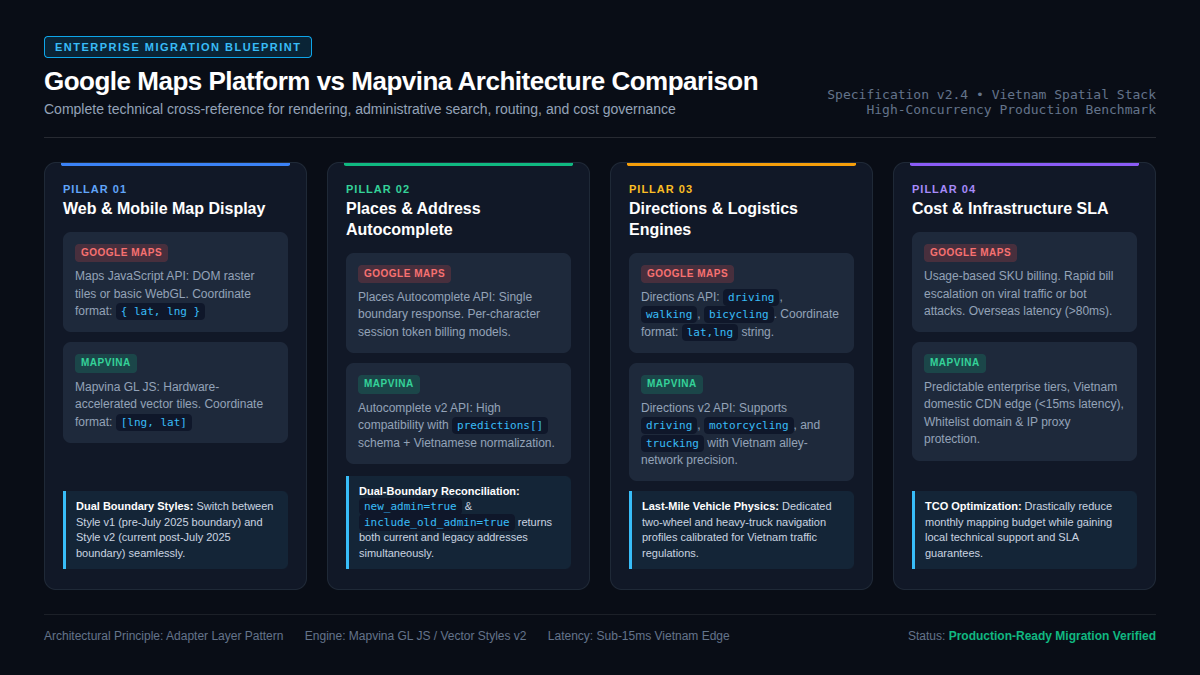
Both Google Maps and Mapvina deliver full-stack geospatial capabilities spanning browser/mobile client SDKs and high-throughput server-to-server REST engines. The following cross-reference table summarizes the core service mappings, protocols, and technical differentiators:
| Functional Domain | Google Maps Platform | Mapvina | Technical Implementation Notes |
|---|---|---|---|
| Web Map Rendering | Maps JavaScript API (google.maps.Map) |
Mapvina GL JS (mapvinagl.Map) |
Mapvina utilizes hardware-accelerated vector tiles via WebGL; provides Style v1 (legacy boundaries) and Style v2 (post-July 2025 boundaries). |
| Coordinate Ordering | Object { lat, lng } or array [lat, lng] |
GeoJSON Array [lng, lat] |
Mapvina GL JS enforces strict GeoJSON convention (longitude first, latitude second). Must invert coordinates during client rendering. |
| Marker & Pin Placement | new google.maps.Marker() |
new mapvinagl.Marker() |
Mapvina markers are lightweight HTML/SVG elements added directly to vector map canvases. |
| Information Windows | new google.maps.InfoWindow() |
new mapvinagl.Popup() |
Popups bind to markers via method chaining (marker.setPopup(popup).addTo(map)). |
| Address Autocomplete | Places Autocomplete (/place/autocomplete/json) |
Autocomplete v2 (/api/v2/place/autocomplete/json) |
Mapvina supports new_admin=true for updated boundaries and include_old_admin=true to receive both legacy and modern data in a single payload. |
| Full-Text Place Search | Places Text Search API | Search v2 (/api/v2/place/textsearch/json) |
Accepts arbitrary text strings, landmark names, or coordinates with dual-boundary enrichment. |
| Place Details | Place Details API (/place/details/json) |
Place Details v2 (/api/v2/place/details/json) |
place_id namespaces are strictly incompatible. Never cross-reference Google Place IDs against Mapvina endpoints. |
| Forward & Reverse Geocoding | Geocoding API (/geocode/json) |
Geocoding v2 (/api/v2/geocode/json) |
Provides forward address-to-coordinate and reverse coordinate-to-address conversion with dual-boundary flags. |
| Turn-by-Turn Routing | Directions API (/directions/json) |
Directions v2 (/route/v2/directions/json) |
Origin/destination formatted as lat,lng strings. Mapvina adds native motorcycling and truck routing profiles tailored for Vietnam road networks. |
| Travel Distance Matrix | Distance Matrix API (/distancematrix/json) |
Distance Matrix v1 (/distance-matrix/v1/...) |
Returns route matrices with distance in integer meters and travel duration in integer seconds. |
1. Migrating Web Map Display (Map, Marker, Popup)
Rendering interactive maps and pinning coordinates represents the foundational building block for e-commerce, real estate, and delivery applications.
Legacy Implementation: Google Maps JavaScript API
In standard Google Maps implementations, developers include an external script tag and initialize the canvas within a DOM container:
<!-- Google Maps JavaScript API -->
<script src="https://maps.googleapis.com/maps/api/js?key=GOOGLE_API_KEY"></script>

<div id="map" style="width: 100%; height: 500px;"></div>

<script>
  function initGoogleMap() {
    const center = { lat: 10.7769, lng: 106.7009 }; // Ben Thanh Market, Ho Chi Minh City
    const map = new google.maps.Map(document.getElementById('map'), {
      zoom: 15,
      center: center
    });

    const marker = new google.maps.Marker({
      position: center,
      map: map,
      title: 'Ben Thanh Market'
    });

    const infoWindow = new google.maps.InfoWindow({
      content: '<strong>Ben Thanh Market</strong><p>District 1, Ho Chi Minh City</p>'
    });

    marker.addListener('click', () => {
      infoWindow.open(map, marker);
    });
  }
  window.onload = initGoogleMap;
</script>
Modern Implementation: Mapvina GL JS
Mapvina utilizes mapvina-gl, a hardware-accelerated vector rendering engine built on top of WebGL standards. Rather than loading rasterized imagery tiles, Mapvina GL JS streams vector tile geometries dynamically, enabling smooth client-side rotation, pitch adjustments, and sub-second theme switching.
Crucially, Mapvina provides two separate cartographic styles: Style v1 (reflecting historical administrative boundaries prior to July 1, 2025) and Style v2 (reflecting current reorganized boundaries). Applications can dynamically toggle between styles without reinitializing the map canvas.
<!-- Mapvina GL JS Assets -->
<link rel="stylesheet" href="https://unpkg.com/mapvina-gl@latest/dist/mapvina-gl.css" />
<script src="https://unpkg.com/mapvina-gl@latest/dist/mapvina-gl.js"></script>

<div id="map" style="width: 100%; height: 500px;"></div>

<script>
  function initMapvinaMap() {
    // CRITICAL: Mapvina GL JS follows GeoJSON ordering: [Longitude, Latitude]
    const center = [106.7009, 10.7769];
    const apiKey = 'YOUR_MAPVINA_PUBLIC_KEY';

    const map = new mapvinagl.Map({
      container: 'map',
      // Loading Style v2 for modern post-reorganization boundaries
      style: `https://maps.mapvina.com/styles/v2/streets.json?key=${apiKey}`,
      center: center,
      zoom: 15
    });

    // Create contextual popup
    const popup = new mapvinagl.Popup({ offset: 25 }).setHTML(
      '<strong>Ben Thanh Market</strong><p>Ben Thanh Ward, District 1, Ho Chi Minh City</p>'
    );

    // Instantiate marker and bind popup via method chaining
    new mapvinagl.Marker({ color: '#10b981' })
      .setLngLat(center)
      .setPopup(popup)
      .addTo(map);
  }
  window.onload = initMapvinaMap;
</script>
Critical Client SDK Differentiators:
- Coordinate Sequence Inversion: This is the most common migration failure point. Google Maps universally accepts coordinate objects
{ lat, lng }or arrays[lat, lng]. Mapvina GL JS adheres strictly to GeoJSON and WebGL specifications where longitude precedes latitude:[lng, lat]. Passing latitude first will place coordinates in the Indian Ocean or Antarctica. - Declarative Vector Styles: Google Maps packages cartographic styling into proprietary server-side definitions. Mapvina exposes standard JSON style specifications (
streets.json). Developers can modify layer paint properties, hide non-essential labels, or customize brand colors client-side without incurring additional server round-trips. - Popup Lifecycle Management: While Google Maps requires manual event binding (
marker.addListener('click', ...)) to manage InfoWindow visibility, Mapvina GL JS encapsulates popup binding directly on the marker instance via.setPopup(popup).
When supporting users across transition periods, applications should provide a UI toggle permitting operators to switch between historical and updated boundary cartography:
const boundaryStyles = {
  legacy: `https://maps.mapvina.com/styles/v1/streets.json?key=${apiKey}`,
  modern: `https://maps.mapvina.com/styles/v2/streets.json?key=${apiKey}`
};

function setMapAdministrativeStyle(mode) {
  if (boundaryStyles[mode]) {
    map.setStyle(boundaryStyles[mode]);
  }
}
2. Migrating Places Autocomplete & Dual-Boundary Reconciliation
Address autocomplete inputs are essential for minimizing friction during customer checkout, address registration, and courier dispatch.
Protocol Comparison
Google Places Autocomplete:
“text“
GET https://maps.googleapis.com/maps/api/place/autocomplete/json
?input=336 Trương Công Định
&language=vi
&components=country:vn
&key=GOOGLE_KEY
Mapvina Autocomplete v2:
“text“
GET https://maps.mapvina.com/api/v2/place/autocomplete/json
?input=336 Trương Công Định
&size=5
&new_admin=true
&include_old_admin=true
&key=MAPVINA_KEY
Mapvina Autocomplete v2 is engineered with direct schema compatibility for applications migrating from Google Places. Both endpoints accept an input query string and return an HTTP 200 payload containing a status: "OK" descriptor and a predictions[] array containing place_id, description, and structured_formatting.
Resolving Historical vs. Modern Address Ambiguity
By default, Mapvina REST APIs return address components aligned with legacy boundaries to preserve backwards compatibility for existing deployments. Setting new_admin=true prompts the geocoding engine to output official post-reform administrative names.
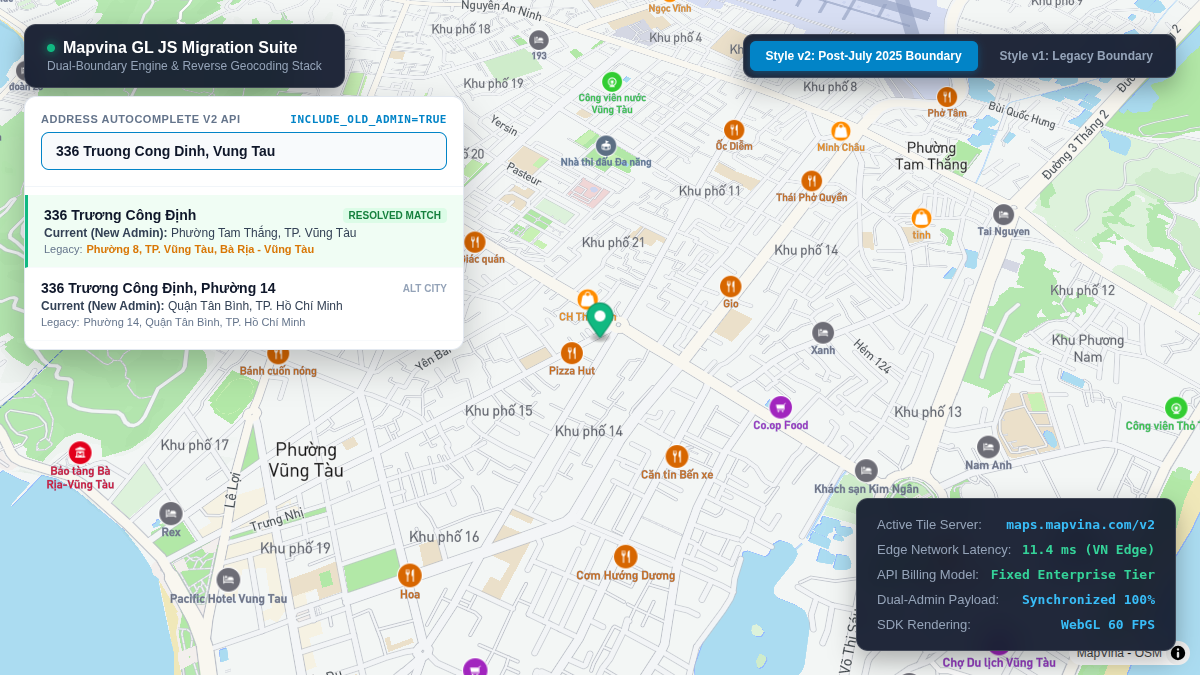
When include_old_admin=true is appended, the response provides both representations simultaneously:
– description: The official current address string (e.g., 336 Trương Công Định, Phường Tam Thắng, TP. Vũng Tàu).
– old_formatted_address: The legacy administrative string (e.g., 336 Trương Công Định, Phường 8, TP. Vũng Tàu, Bà Rịa – Vũng Tàu).
– old_address_components: Structured breakdown of legacy provincial, district, and ward entities.
Production JavaScript Implementation
The following production service class implements Mapvina Autocomplete with request cancellation (AbortController) to handle rapid keystroke debouncing:
class MapvinaSearchService {
  constructor(apiKey) {
    this.apiKey = apiKey;
    this.abortController = null;
  }

  async autocomplete(query) {
    if (!query || query.trim().length < 2) {
      return [];
    }

    // Cancel in-flight HTTP request if the user continues typing
    if (this.abortController) {
      this.abortController.abort();
    }
    this.abortController = new AbortController();

    const queryParams = new URLSearchParams({
      input: query.trim(),
      key: this.apiKey,
      size: '5',
      new_admin: 'true',
      include_old_admin: 'true'
    });

    const endpoint = `https://maps.mapvina.com/api/v2/place/autocomplete/json?${queryParams}`;

    try {
      const response = await fetch(endpoint, { signal: this.abortController.signal });
      if (!response.ok) {
        throw new Error(`Mapvina Autocomplete HTTP error: ${response.status}`);
      }

      const data = await response.json();
      if (data.status !== 'OK' && data.status !== 'ZERO_RESULTS') {
        throw new Error(data.error_message || `API Error Status: ${data.status}`);
      }

      // Return normalized schema for UI autocomplete components
      return (data.predictions || []).map(prediction => ({
        placeId: prediction.place_id,
        currentAddress: prediction.description,
        legacyAddress: prediction.old_formatted_address || '',
        mainText: prediction.structured_formatting?.main_text || prediction.description,
        secondaryText: prediction.structured_formatting?.secondary_text || '',
        legacyComponents: prediction.old_address_components || []
      }));
    } catch (err) {
      if (err.name === 'AbortError') {
        return []; // Suppress aborted fetch exceptions
      }
      console.error('[MapvinaSearchService] Query error:', err);
      throw err;
    }
  }
}
Because Mapvina maintains standard prediction structures, existing UI dropdowns, autocomplete hooks, and form state stores require virtually zero refactoring.
3. Migrating Place Details & Coordinate Retrieval
Once a user selects a candidate address from the autocomplete dropdown, the client must resolve its precise coordinates (latitude, longitude) and structured administrative metadata to persist into order records or render map pins.
Endpoint Comparison
Google Place Details:
“text“
GET https://maps.googleapis.com/maps/api/place/details/json
?place_id=ChIJ123456789...
&fields=formatted_address,geometry
&key=GOOGLE_KEY
Mapvina Place Details v2:
“text“
GET https://maps.mapvina.com/api/v2/place/details/json
?place_id=MAPVINA_PLACE_ID
&key=MAPVINA_KEY
JSON Response Structure
Both providers return a top-level result object containing geocoded geometry:
{
  "status": "OK",
  "result": {
    "place_id": "mapvina_pid_982341",
    "name": "Landmark 81",
    "formatted_address": "720A Điện Biên Phủ, Phường 22, Bình Thạnh, TP. Hồ Chí Minh",
    "geometry": {
      "location": {
        "lat": 10.7951,
        "lng": 106.7218
      }
    }
  }
}
Production Coordinate Resolution Snippet
async function resolvePlaceCoordinates(placeId, apiKey) {
  const params = new URLSearchParams({
    place_id: placeId,
    key: apiKey
  });

  const url = `https://maps.mapvina.com/api/v2/place/details/json?${params}`;
  const response = await fetch(url);
  const data = await response.json();

  if (data.status !== 'OK' || !data.result) {
    throw new Error(data.error_message || 'Failed to retrieve place details from Mapvina.');
  }

  const location = data.result.geometry?.location;
  return {
    formattedAddress: data.result.formatted_address || data.result.name,
    latitude: location?.lat,
    longitude: location?.lng,
    // Formatted array ready for Mapvina GL JS: [lng, lat]
    coordinates: [location?.lng, location?.lat]
  };
}
The Golden Rule of Place IDs: Place ID identifiers generated by Google Maps and Mapvina exist in completely separate cryptographic namespaces. Never store a Google
place_idin an application database with the expectation of querying it against Mapvina APIs during subsequent sessions. The correct lifecycle requires: (1) Autocomplete search via Mapvina $\rightarrow$ (2) Obtain Mapvinaplace_id$\rightarrow$ (3) Fetch Place Details via Mapvina $\rightarrow$ (4) Persist raw coordinates (lat,lng) and standardized address strings to the application database.
4. Migrating Directions & Logistics Routing
For on-demand delivery, ride-hailing, and courier dispatch systems, the routing engine determines travel distance calculations, route polyline rendering, and automated freight pricing.
API Configuration Parity
Google Directions API:
“text“
GET https://maps.googleapis.com/maps/api/directions/json
?origin=10.7769,106.7009
&destination=10.7951,106.7218
&mode=driving
&key=GOOGLE_KEY
Mapvina Directions v2:
“text“
GET https://maps.mapvina.com/route/v2/directions/json
?origin=10.7769,106.7009
&destination=10.7951,106.7218
&mode=motorcycling
&key=MAPVINA_KEY
Mapvina Directions v2 preserves identical coordinate string syntax (latitude,longitude) for origin and destination parameters, minimizing URL formatting changes during migration.
Transportation Mode Differences:
Google Maps Modes: driving, walking, bicycling, transit.
Mapvina Directions Modes: driving, motorcycling, walking, truck.
Vietnam’s urban logistics ecosystem is heavily dependent on two-wheeled motorcycle transport. While Google Maps frequently applies generic car physics or bicycle profiles to two-wheelers, Mapvina features a native motorcycling mode calibrated for Vietnam’s dense alley networks (hẻm/ngõ), dedicated two-wheel overpasses, and vehicle-specific turn prohibitions. Furthermore, Mapvina includes a dedicated truck mode that enforces urban load limits and commercial vehicle curfew hours.
async function calculateLogisticsRoute(origin, destination, mode = 'motorcycling', apiKey) {
  // origin and destination accept { lat: number, lng: number }
  const originParam = `${origin.lat},${origin.lng}`;
  const destinationParam = `${destination.lat},${destination.lng}`;

  const queryParams = new URLSearchParams({
    origin: originParam,
    destination: destinationParam,
    mode: mode,
    key: apiKey
  });

  const url = `https://maps.mapvina.com/route/v2/directions/json?${queryParams}`;
  const response = await fetch(url);
  const data = await response.json();

  if (!response.ok || data.status !== 'OK' || !data.routes?.length) {
    throw new Error(data.error_message || 'Routing engine could not determine a valid path.');
  }

  const primaryRoute = data.routes[0];
  const leg = primaryRoute.legs?.[0];

  return {
    // Distance in integer meters
    distanceMeters: leg?.distance?.value || 0,
    // Duration in integer seconds
    durationSeconds: leg?.duration?.value || 0,
    // Localized formatted text strings
    distanceDisplay: leg?.distance?.text || '',
    durationDisplay: leg?.duration?.text || '',
    // Encoded polyline string ready for client decoding
    encodedPolyline: primaryRoute.overview_polyline?.points || ''
  };
}
5. Architectural Pattern: The Decoupled Provider Adapter
Directly refactoring hundreds of hard-coded google.maps.* calls across an enterprise codebase introduces high regression risk and makes disaster recovery difficult if unexpected issues arise during rollout.
A robust software engineering approach encapsulates geospatial operations behind a decoupled Adapter Layer Interface. By programming against a domain interface rather than a vendor-specific SDK, the underlying provider can be swapped via configuration flags or dynamically routed based on traffic percentages.
TypeScript Adapter Interface Definition
export interface GeoCoordinate {
  lat: number;
  lng: number;
}

export interface RouteTelemetry {
  distanceMeters: number;
  durationSeconds: number;
  distanceDisplay: string;
  durationDisplay: string;
  encodedPolyline?: string;
}

export interface AutocompleteCandidate {
  id: string;
  currentAddress: string;
  legacyAddress?: string;
  mainText: string;
}

export interface IMapProvider {
  searchAddress(text: string): Promise<AutocompleteCandidate[]>;
  resolveLocation(placeId: string): Promise<GeoCoordinate>;
  calculateRoute(
    origin: GeoCoordinate,
    destination: GeoCoordinate,
    vehicleMode?: 'driving' | 'motorcycling' | 'walking'
  ): Promise<RouteTelemetry>;
}
Production Mapvina Provider Implementation
export class MapvinaEnterpriseProvider implements IMapProvider {
  constructor(private readonly apiKey: string) {}

  async searchAddress(text: string): Promise<AutocompleteCandidate[]> {
    const params = new URLSearchParams({
      input: text,
      key: this.apiKey,
      size: '5',
      new_admin: 'true',
      include_old_admin: 'true'
    });

    const response = await fetch(
      `https://maps.mapvina.com/api/v2/place/autocomplete/json?${params}`
    );
    const data = await response.json();

    return (data.predictions || []).map((p: any) => ({
      id: p.place_id,
      currentAddress: p.description,
      legacyAddress: p.old_formatted_address || '',
      mainText: p.structured_formatting?.main_text || p.description
    }));
  }

  async resolveLocation(placeId: string): Promise<GeoCoordinate> {
    const params = new URLSearchParams({
      place_id: placeId,
      key: this.apiKey
    });

    const response = await fetch(
      `https://maps.mapvina.com/api/v2/place/details/json?${params}`
    );
    const data = await response.json();
    const loc = data.result?.geometry?.location;

    if (!loc) {
      throw new Error(`Location coordinates unavailable for place_id: ${placeId}`);
    }

    return { lat: loc.lat, lng: loc.lng };
  }

  async calculateRoute(
    origin: GeoCoordinate,
    destination: GeoCoordinate,
    vehicleMode = 'motorcycling'
  ): Promise<RouteTelemetry> {
    const params = new URLSearchParams({
      origin: `${origin.lat},${origin.lng}`,
      destination: `${destination.lat},${destination.lng}`,
      mode: vehicleMode,
      key: this.apiKey
    });

    const response = await fetch(
      `https://maps.mapvina.com/route/v2/directions/json?${params}`
    );
    const data = await response.json();
    const leg = data.routes?.[0]?.legs?.[0];

    return {
      distanceMeters: leg?.distance?.value || 0,
      durationSeconds: leg?.duration?.value || 0,
      distanceDisplay: leg?.distance?.text || '',
      durationDisplay: leg?.duration?.text || '',
      encodedPolyline: data.routes?.[0]?.overview_polyline?.points
    };
  }
}
By injecting IMapProvider into application services (such as shipping fee calculators or address book controllers), transitioning between Google Maps and Mapvina requires updating a single provider initialization line within configuration files.
6. Engineering Gotchas & Production Checklist
Teams executing geospatial migrations frequently encounter subtle implementation discrepancies that cause production bugs:
1. The Three Coordinate Paradigms
- Mapvina GL JS (Browser Canvas): Requires GeoJSON array format:
[longitude, latitude]. - Mapvina Directions / Geocoding REST APIs: Requires formatted query strings:
"latitude,longitude". - Database Storage & Domain Models: Typically stored as key-value objects:
{ lat: number, lng: number }.
2. Client vs. Server API Key Hygiene
- Public Client Keys: Keys utilized directly inside web browsers or mobile apps must be restricted via HTTP Referrer Domain Allowlisting (e.g.,
<em>.yourdomain.com/</em>) in the Mapvina Portal to prevent unauthorized third-party usage. - Private Server Keys: Keys utilized for backend routing, geocoding batch jobs, or distance matrix queries must remain isolated in environment variables (
.env) and never exposed to client bundles.
3. Metric Units in Billing and Calculations
Mapvina adheres strictly to SI units across all responses: distances are returned in integer meters, and travel times are returned in integer seconds. Always apply explicit unit conversions (/ 1000 for kilometers, / 60 for minutes) before rendering UI strings or applying pricing tariffs.
4. Semantic Error Inspection
Do not rely solely on HTTP status codes (such as HTTP 200 OK) to determine request success. Like Google Maps, Mapvina returns HTTP 200 for application-level errors such as quota exhaustion (OVER_QUERY_LIMIT) or invalid authentication (REQUEST_DENIED). Applications must validate the top-level status field in the parsed JSON body before consuming payload properties.
Conclusion & Implementation Checklist
A successful mapping platform migration requires technical parity across three synchronized tiers:
- Cartographic Rendering: Aligning map canvases with Style v1 (legacy) or Style v2 (modern) vector tiles.
- Search Normalization: Accepting both historical and modern administrative search keywords seamlessly.
- Data Persistence: Preserving both
formatted_addressandold_formatted_addressfields so customer profiles, order history, and CRM ledgers maintain continuity.
Before initiating code changes, audit your existing Google Cloud billing breakdown to identify your highest-volume SKUs. Benchmark those volumes against Mapvina’s enterprise tiers, and test your core delivery coordinates across motorcycle and truck profiles. By pairing an abstracted Adapter Layer with Mapvina’s native dual-boundary capabilities, enterprises can substantially reduce infrastructure overhead while delivering superior local cartographic precision.
References & Technical Documentation
- [1] Mapvina API Integration Guide: https://docs.mapvina.com/api-integration
- [2] Mapvina GL JS Developer Documentation: https://docs.mapvina.com/guides
- [3] Mapvina Enterprise Solutions & Pricing: https://mapvina.com/en
- [4] Google Maps Platform Routes Migration Guide: https://developers.google.com/maps/documentation/routes/migrate-routes
- [5] Mapvina Directions API v2 Specification: https://docs.mapvina.com/api-integration/directions/v2
- [6] Mapvina Distance Matrix API v1 Specification: https://docs.mapvina.com/api-integration/distance-matrix/v1
- [7] Mapvina Administrative Boundary Restructuring Guide: https://mapvina.com/en
- [8] Mapvina Autocomplete API v2 Specification: https://docs.mapvina.com/api-integration/autocomplete/v2
- [9] Mapvina Search API v2 Documentation: https://docs.mapvina.com/api-integration/search/v2
- [10] Google Maps Platform SKU Pricing Documentation: https://mapsplatform.google.com/pricing
Trích dẫn & Nguồn gốc nội dung
Nội dung chuyên môn, cấu trúc giải pháp và thông số tham chiếu trong bài viết này được đối soát trực tiếp từ hệ thống dịch vụ của trang gốc: MapVina.com ↗.
Tìm hiểu giải pháp Maps API của MapVina
Nền tảng bản đồ số và dữ liệu địa chỉ tối ưu cho thị trường Việt Nam.
Khám phá MapVina ↗