

Primary Reference: This software architecture and high-performance geospatial engineering guide is compiled and synthesized based on developer documentation, WebGL performance benchmarks, and RFC specifications from Mapvina (https://mapvina.com) – The Digital Mapping & Address Intelligence Platform for Vietnam.
1. Introduction: The DOM Overhead Breakdown at 10,000 Points
When modern digital enterprises scale their physical distribution networks, retail chains, or customer databases from a few hundred locations to 5,000, 20,000, or even 50,000 points, interactive web maps frequently hit a severe performance bottleneck.
If an engineering team continues relying on standard DOM Markers (such as new mapvinagl.Marker() or Google Maps google.maps.Marker), the browser’s Document Object Model is forced to manage a discrete HTML element for every single geographic coordinate. On standard office laptops and mobile devices, panning or zooming across the map causes intense frame drops—often plummeting from a smooth 60 FPS down to an unresponsive 10–15 FPS, or crashing the browser tab altogether due to memory exhaustion.
The Architectural Solution: High-performance geospatial visualization requires pairing the GPU hardware-acceleration of Mapvina GL JS with Dynamic Spatial Clustering and Spatial Bounding Box Queries. By offloading coordinate calculations from the CPU Main Thread directly to WebGL vertex buffers, applications can effortlessly render 50,000+ customer points with fluid, 60 FPS responsiveness.
In this engineering guide, we dissect the root causes of browser layout thrashing, provide a step-by-step implementation of 3-tier WebGL clustering, and deliver a complete, self-contained single-file HTML application that runs immediately in any modern web browser.
2. Technical Root Cause: DOM Markers vs. WebGL Canvas Rendering
To optimize geospatial performance effectively, software engineers must understand how the browser engine processes visual elements on screen.
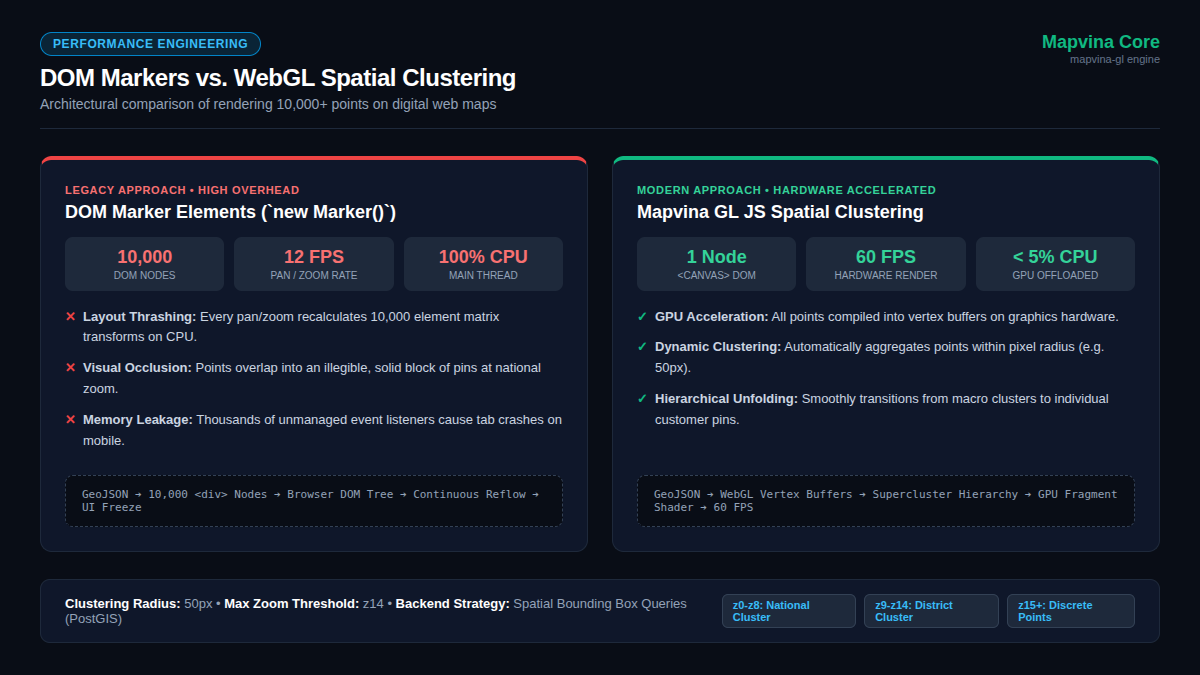
The Main Thread Bottleneck with DOM Markers
In conventional mapping libraries, each marker is instantiated as an independent HTML <div> or <img> element appended directly into the DOM tree.
When displaying 10,000 locations:
1. Layout Thrashing & Continuous Reflow: The DOM must track 10,000 separate nodes, each with attached event listeners. Every time the user pans or zooms, the JavaScript engine must recompute screen coordinates and mutate CSS transforms (transform: translate3d(...)) across all 10,000 nodes simultaneously.
2. CPU Saturation: This continuous reflow saturates the browser’s single JavaScript Main Thread at 100% CPU utilization, starving user interaction events and causing severe UI stutter.
3. Visual Occlusion: At macro zoom levels (e.g., viewing all of Vietnam), thousands of individual pins overlap into an illegible, solid mass of marker icons, offering zero business intelligence to the operator.
WebGL Hardware-Accelerated Rendering in Mapvina GL JS
In contrast, Mapvina GL JS renders the entire vector base map and all data overlays onto a single <canvas> element powered by WebGL.
Instead of generating individual HTML elements, geographic coordinates are packaged into an in-memory GeoJSON Source and streamed directly to the graphics hardware (GPU) as vertex buffers. The GPU handles matrix transformations and fragment shading in parallel across thousands of cores. Coordinate recalculations take less than 2 milliseconds, maintaining a rock-solid 60 FPS regardless of map movement.
| Technical Benchmark | DOM Markers (new Marker()) |
WebGL Layers (Mapvina GL JS) |
|---|---|---|
| DOM Element Footprint | 1 HTML <div> per point (10,000+ nodes) |
Exactly 1 <canvas> node in DOM |
| Processing Unit | CPU (Browser Main Thread) | GPU (Hardware Graphics Pipeline) |
| Pan / Zoom Behavior | Constant Reflow / Repaint cycles | Instant GPU vertex matrix multiplication |
| Frame Rate (10,000 pts) | 10 – 15 FPS (Severe UI freezing) | Stable 60 FPS (Sub-16ms frame budget) |
| Memory Architecture | High heap overhead per DOM object | Compact typed arrays in graphics buffer |
| Clustering Support | Requires third-party DOM plugins | Native engine Supercluster integration |
3. Spatial Clustering Mechanics in Mapvina GL JS
Even when hardware acceleration easily handles thousands of raw points, displaying dense points at national zoom levels produces extreme visual clutter.
Spatial Clustering resolves this by grouping points that fall within a specified pixel radius into a single cluster circle labeled with the total point count. As the user zooms in, clusters dynamically subdivide into smaller regional clusters, eventually resolving into individual discrete points.
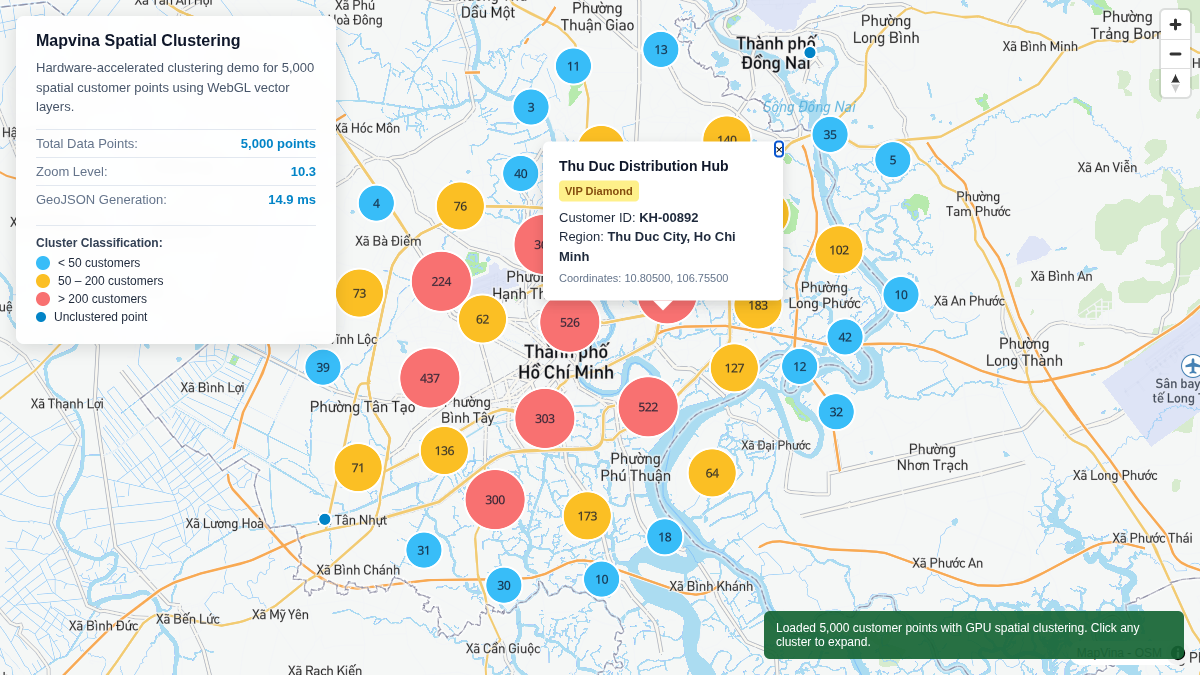
Core GeoJSON Source Configuration Parameters
In Mapvina GL JS, clustering is enabled directly on the GeoJSON source:
cluster: true: Activates the built-in spatial clustering engine (based on a high-speed hierarchical k-d tree implementation).
clusterRadius: 50: The clustering radius in screen pixels. If two or more points fall within 50px of each other at the current zoom level, they merge into a cluster. Values between 40px and 70px provide optimal visual balance.
clusterMaxZoom: 14: The maximum zoom level where clustering occurs. At zoom 15 and above (street and neighborhood level), clusters automatically dissolve into discrete points so users can inspect individual facilities.
clusterProperties: Allows calculating dynamic aggregate statistics for each cluster (e.g., summing order revenues or counting VIP tier accounts within the cluster).
The 3-Layer WebGL Presentation Architecture
To present clustered data cleanly, we declare three synchronized WebGL layers against the same GeoJSON source:
- Cluster Circles Layer (
type: 'circle'): Uses the filter['has', 'point_count']to render only aggregated clusters. Employs a dynamicsteppaint expression to scale circle diameter and apply semantic color coding based on volume (e.g., Light Blue for< 50, Amber for50–200, Red for> 200). - Cluster Count Symbol Layer (
type: 'symbol'): Uses the same['has', 'point_count']filter to render the formatted point count ({point_count_abbreviated}) at the exact geometric center of each circle. - Unclustered Points Layer (
type: 'circle'): Uses the inverted filter['!', ['has', 'point_count']]to render discrete customer markers (e.g., 6px radius circles with white borders) for locations that are not part of an aggregate cluster.
4. Scaling to Millions: Spatial Bounding Box (BBOX) Queries
When enterprise customer databases grow to 100,000 or millions of records, transferring the entire dataset over the network is neither practical nor bandwidth-efficient.
The Spatial Bounding Box Workflow
Instead of downloading massive payloads on initial page load, modern architectures implement Viewport-Bounded Streaming:
[ Client Mapvina Viewport ]
             │
             │ (1) User finishes Pan / Zoom ('moveend')
             ▼
[ Calculate Bounding Box ] ──> bounds = map.getBounds()
             │                 [minLng, minLat, maxLng, maxLat]
             │
             │ (2) GET /api/customers?bbox=106.65,10.75,106.75,10.85&zoom=12
             ▼
[ Spatial Database (PostGIS / MongoDB) ]
   └── ST_MakeEnvelope(minLng, minLat, maxLng, maxLat, 4326)
             │
             │ (3) Return Compact GeoJSON FeatureCollection
             ▼
[ Client GPU Buffer Swap ] ──> map.getSource('customers').setData(geojson)
Key Advantages:
Zero Network Bloat: The client only downloads features visible within their immediate viewport.
Seamless Buffer Swaps: Mapvina GL JS’s map.getSource('customers').setData(newData) method replaces the GPU vertex buffer in-place without tearing down or reconstructing existing layers, eliminating visual flicker.
* Mobile-Safe Footprint: Memory usage remains strictly bounded, preventing mobile browsers from terminating tabs during intensive navigation.
5. Step-by-Step Implementation Guide
Follow this 5-step engineering pattern to integrate hardware-accelerated clustering into your production web application.
Step 1: Standardize GeoJSON Data Structure
Ensure customer data adheres to RFC 7946 GeoJSON format. Crucial Rule: GeoJSON strictly mandates [Longitude, Latitude] coordinate ordering:
{
  "type": "FeatureCollection",
  "features": [
    {
      "type": "Feature",
      "geometry": {
        "type": "Point",
        "coordinates": [106.75500, 10.80500]
      },
      "properties": {
        "id": "KH-00892",
        "name": "Thu Duc Distribution Hub",
        "tier": "VIP Diamond"
      }
    }
  ]
}
Production Tip: Keep feature properties lean. Include only fields required for styling, filtering, or primary popup display. Avoid packing extensive transaction logs into client-facing GeoJSON payloads.
Step 2: Initialize Mapvina GL JS Container
Include the Mapvina GL JS library from CDN and create a responsive container:
<!-- Mapvina GL JS CSS & JavaScript SDK -->
<link rel="stylesheet" href="https://unpkg.com/[email protected]/dist/mapvina-gl.css" />
<script src="https://unpkg.com/[email protected]/dist/mapvina-gl.js"></script>

<div id="map" style="width: 100%; height: 600px;"></div>
Initialize the map instance with your authorized key:
const map = new mapvinagl.Map({
  container: 'map',
  style: 'https://maps.mapvina.com/styles/v2/streets.json?key=public_key',
  center: [106.72, 10.79], // Ho Chi Minh City [lng, lat]
  zoom: 10
});
Step 3: Register GeoJSON Source with Clustering Enabled
Listen for the map’s load event to ensure vector assets are ready, then mount the source:
map.on('load', () => {
  map.addSource('customers', {
    type: 'geojson',
    data: customerGeoJsonData, // In-memory object or GeoJSON endpoint URL
    cluster: true,
    clusterRadius: 50,         // Cluster radius in pixels
    clusterMaxZoom: 14         // Dissolve into discrete points at zoom >= 15
  });
});
Step 4: Add the 3 WebGL Visualization Layers
Add cluster circles, cluster count labels, and discrete points:
// 1. Cluster Circles Layer
map.addLayer({
  id: 'clusters',
  type: 'circle',
  source: 'customers',
  filter: ['has', 'point_count'],
  paint: {
    'circle-color': [
      'step',
      ['get', 'point_count'],
      '#38bdf8', // < 50 customers: Light Blue
      50,
      '#fbbf24', // 50 - 200 customers: Amber
      200,
      '#f87171'  // > 200 customers: Coral Red
    ],
    'circle-radius': [
      'step',
      ['get', 'point_count'],
      18,        // < 50 count: 18px radius
      50,
      24,        // 50 - 200 count: 24px radius
      200,
      30         // > 200 count: 30px radius
    ],
    'circle-stroke-width': 2,
    'circle-stroke-color': '#ffffff'
  }
});

// 2. Cluster Count Text Layer
map.addLayer({
  id: 'cluster-count',
  type: 'symbol',
  source: 'customers',
  filter: ['has', 'point_count'],
  layout: {
    'text-field': '{point_count_abbreviated}',
    'text-font': ['Noto Sans Regular'],
    'text-size': 12
  },
  paint: {
    'text-color': '#0f172a'
  }
});

// 3. Unclustered Discrete Points Layer
map.addLayer({
  id: 'unclustered-point',
  type: 'circle',
  source: 'customers',
  filter: ['!', ['has', 'point_count']],
  paint: {
    'circle-color': '#0284c7',
    'circle-radius': 6,
    'circle-stroke-width': 2,
    'circle-stroke-color': '#ffffff'
  }
});
Step 5: Attach Interactive Zoom & Popup Handlers
Provide intuitive user interaction when clicking clusters or discrete locations:
// Smoothly zoom in when clicking a cluster
map.on('click', 'clusters', (e) => {
  const features = map.queryRenderedFeatures(e.point, { layers: ['clusters'] });
  const clusterId = features[0].properties.cluster_id;

  map.getSource('customers').getClusterExpansionZoom(clusterId, (err, zoom) => {
    if (err) return;
    map.easeTo({
      center: features[0].geometry.coordinates,
      zoom: zoom + 0.5,
      duration: 500
    });
  });
});

// Open rich detail popup when clicking an unclustered point
map.on('click', 'unclustered-point', (e) => {
  const coords = e.features[0].geometry.coordinates.slice();
  const props = e.features[0].properties;

  new mapvinagl.Popup()
    .setLngLat(coords)
    .setHTML(`
      <strong>${props.name}</strong><br>
      ID: ${props.id}<br>
      Tier: ${props.tier}
    `)
    .addTo(map);
});

// Cursor hover feedback
map.on('mouseenter', 'clusters', () => { map.getCanvas().style.cursor = 'pointer'; });
map.on('mouseleave', 'clusters', () => { map.getCanvas().style.cursor = ''; });
map.on('mouseenter', 'unclustered-point', () => { map.getCanvas().style.cursor = 'pointer'; });
map.on('mouseleave', 'unclustered-point', () => { map.getCanvas().style.cursor = ''; });
6. Complete Single-File Standalone HTML Implementation
Below is a self-contained, production-ready HTML implementation. Save this code as index.html and open it directly in any web browser to test hardware-accelerated clustering with 5,000 synthetic locations:
<!DOCTYPE html>
<html lang="en">
<head>
  <meta charset="UTF-8">
  <meta name="viewport" content="width=device-width, initial-scale=1.0">
  <title>Mapvina GL JS - Spatial Clustering 5,000 Locations</title>
  <link rel="stylesheet" href="https://unpkg.com/[email protected]/dist/mapvina-gl.css" />
  <script src="https://unpkg.com/[email protected]/dist/mapvina-gl.js"></script>
  <style>
    body, html, #map { width: 100%; height: 100%; margin: 0; padding: 0; font-family: sans-serif; }
    .info-card {
      position: absolute; top: 16px; left: 16px; z-index: 10;
      background: rgba(255, 255, 255, 0.95); padding: 14px 18px;
      border-radius: 8px; box-shadow: 0 4px 16px rgba(0,0,0,0.12); max-width: 300px;
    }
  </style>
</head>
<body>
  <div class="info-card">
    <h3 style="margin: 0 0 6px 0; font-size: 15px;">5,000 Clustered Locations</h3>
    <div style="font-size: 13px; color: #475569;">GPU WebGL acceleration. Click clusters to expand.</div>
  </div>

  <div id="map"></div>

  <script>
    const map = new mapvinagl.Map({
      container: 'map',
      style: 'https://maps.mapvina.com/styles/v2/streets.json?key=public_key',
      center: [106.72, 10.79],
      zoom: 10
    });

    map.on('load', () => {
      // Generate 5,000 realistic synthetic points
      const features = [];
      for (let i = 1; i <= 5000; i++) {
        const lng = 106.68 + (Math.random() - 0.5) * 0.35;
        const lat = 10.77 + (Math.random() - 0.5) * 0.35;
        features.push({
          type: 'Feature',
          geometry: { type: 'Point', coordinates: [lng, lat] },
          properties: { id: `CUST-${i}`, name: `Location #${i}` }
        });
      }

      map.addSource('customers', {
        type: 'geojson',
        data: { type: 'FeatureCollection', features },
        cluster: true,
        clusterRadius: 50,
        clusterMaxZoom: 14
      });

      map.addLayer({
        id: 'clusters',
        type: 'circle',
        source: 'customers',
        filter: ['has', 'point_count'],
        paint: {
          'circle-color': ['step', ['get', 'point_count'], '#38bdf8', 50, '#fbbf24', 200, '#f87171'],
          'circle-radius': ['step', ['get', 'point_count'], 18, 50, 24, 200, 30],
          'circle-stroke-width': 2,
          'circle-stroke-color': '#fff'
        }
      });

      map.addLayer({
        id: 'cluster-count',
        type: 'symbol',
        source: 'customers',
        filter: ['has', 'point_count'],
        layout: {
          'text-field': '{point_count_abbreviated}',
          'text-font': ['Noto Sans Regular'],
          'text-size': 12
        },
        paint: { 'text-color': '#0f172a' }
      });

      map.addLayer({
        id: 'unclustered-point',
        type: 'circle',
        source: 'customers',
        filter: ['!', ['has', 'point_count']],
        paint: {
          'circle-color': '#0284c7',
          'circle-radius': 6,
          'circle-stroke-width': 2,
          'circle-stroke-color': '#fff'
        }
      });

      map.on('click', 'clusters', (e) => {
        const features = map.queryRenderedFeatures(e.point, { layers: ['clusters'] });
        const clusterId = features[0].properties.cluster_id;
        map.getSource('customers').getClusterExpansionZoom(clusterId, (err, zoom) => {
          if (!err) map.easeTo({ center: features[0].geometry.coordinates, zoom: zoom + 0.5 });
        });
      });

      map.on('click', 'unclustered-point', (e) => {
        const coords = e.features[0].geometry.coordinates.slice();
        const props = e.features[0].properties;
        new mapvinagl.Popup()
          .setLngLat(coords)
          .setHTML(`<strong>${props.name}</strong><br>Code: ${props.id}`)
          .addTo(map);
      });

      map.on('mouseenter', 'clusters', () => map.getCanvas().style.cursor = 'pointer');
      map.on('mouseleave', 'clusters', () => map.getCanvas().style.cursor = '');
    });
  </script>
</body>
</html>
7. Operational Roles, Telemetry KPIs, and Economics
Successfully deploying high-density spatial visualization requires cross-functional engineering alignment:
Frontend Engineer: Integrates mapvina-gl, constructs dynamic step paint expressions, manages UI cursor events, and guarantees responsive layout performance across mobile and desktop devices.
Backend / Geospatial Engineer: Normalizes address coordinates into standardized GeoJSON formats, builds BBOX-filtered spatial endpoints (e.g., PostGIS ST_MakeEnvelope), and implements Redis edge caching for repeated viewport queries.
* Tech Lead / Engineering Manager: Defines clustering radii appropriate for specific business domains (logistics hub planning vs. consumer branch locator) and monitors API usage quotas.
Key Performance Telemetry Metrics
Before moving to production, benchmark four core metrics across representative target hardware:
1. Interaction Frame Rate (FPS): Must sustain $\ge 50$ FPS during rapid continuous pan and pinch-zoom gestures.
2. Cluster Calculation Latency: Initial GeoJSON indexing and clustering calculation should complete in $< 20$ ms on client hardware.
3. Tab Memory Footprint: JavaScript heap consumption should remain stable under 120 MB even after multiple consecutive spatial query updates.
4. Compressed Network Payload: BBOX GeoJSON responses should remain under 250 KB per viewport request when compressed with Gzip or Brotli.
8. Download the Spatial Clustering Quickstart Kit
To accelerate your team’s development cycle, download the complete spatial clustering starter package:
Download Mapvina Spatial Clustering Quickstart
Includes complete standalone single-file Mapvina GL JS client (index.html), synthetic 5,000 location generator, unit test suites, and interactive telemetry dashboard.
9. Conclusion
Rendering large-scale geospatial datasets on the web does not require sacrificing user experience or crashing mobile devices. By replacing fragile DOM Marker patterns with Mapvina GL JS’s WebGL Canvas architecture and built-in Spatial Clustering, modern applications can effortlessly visualize tens of thousands of customer records at 60 FPS.
When enterprise scale extends into millions of locations, combining client-side clustering with Spatial Bounding Box (BBOX) backend filtering provides an unshakeable, future-proof geospatial foundation for modern logistics, retail, and field service operations across Vietnam.
Trích dẫn & Nguồn gốc nội dung
Nội dung chuyên môn, cấu trúc giải pháp và thông số tham chiếu trong bài viết này được đối soát trực tiếp từ hệ thống dịch vụ của trang gốc: MapVina.com ↗.
Tìm hiểu giải pháp Maps API của MapVina
Nền tảng bản đồ số và dữ liệu địa chỉ tối ưu cho thị trường Việt Nam.
Khám phá MapVina ↗