
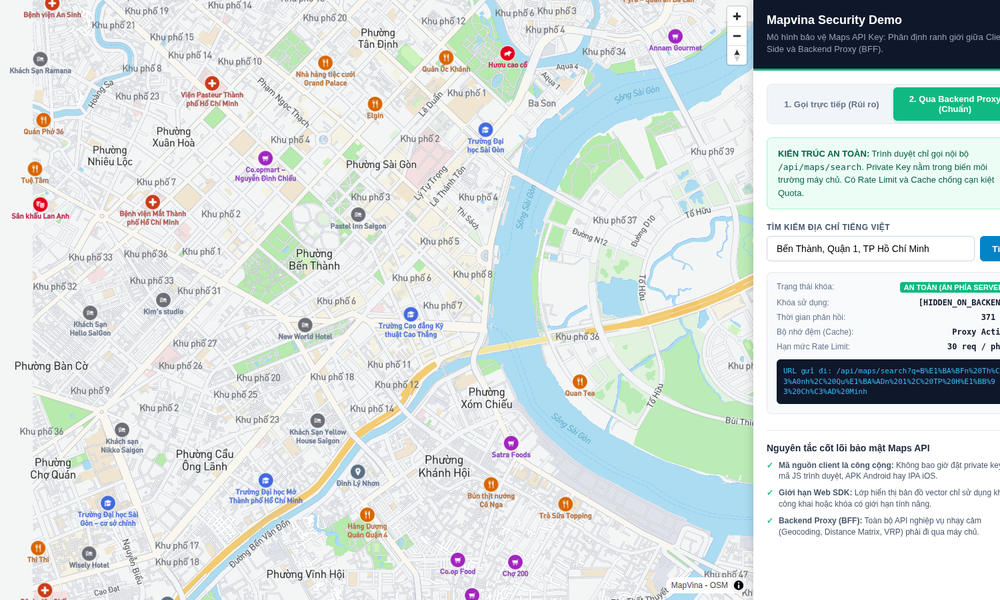
Primary Reference: This comprehensive cybersecurity and systems architecture guide is compiled and synthesized based on developer documentation, network security specifications, and real-world deployment benchmarks from Mapvina (https://mapvina.com) – The Digital Mapping & Address Intelligence Platform for Vietnam.
1. Introduction: The $10,000 Surprise Invoice & The Leaked Key Dilemma
Every software engineering team that embeds location intelligence into customer-facing products eventually confronts an uncomfortable architectural dilemma:
“To render interactive maps in our web browser or mobile client, the client application must authenticate requests by sending an API key. But anything sent to a client browser or packed into an Android APK can be inspected, extracted, and stolen within seconds. How do we expose the API key to render the map without exposing our entire corporate cloud budget to runaway scraping and rogue billing?”
This is not a hypothetical anxiety. In the digital mapping and cloud API ecosystem, incidents of stolen credentials occur daily:
A developer hardcodes an unconstrained Google Maps or Mapvina key into a public GitHub repository or React Single Page Application (SPA).
Automated credential-harvesting bots scrape the key within minutes.
Within hours, rogue third-party websites or scrapers funnel millions of geocoding and routing requests through that key.
The engineering lead wakes up to a $5,000 – $15,000 monthly overage invoice, or finds their production services abruptly suspended due to quota exhaustion.
The core vulnerability is a misunderstanding of Client-Side vs. Server-Side trust boundaries. By definition, web browsers and mobile devices are untrusted environments. You cannot hide secrets in client code.
The Core Security Principle: Securing Maps APIs is not about attempting the impossible task of “obfuscating” a key in client-side JavaScript. Instead, it requires implementing a Defense-in-Depth Architecture: strict domain whitelisting for public client tokens, custom bundle ID pinning for mobile applications, Backend-for-Frontend (BFF) proxying for private service endpoints, and proactive quota governance on the administrative portal.
In this architectural guide, we will analyze the attack vectors against mapping APIs, explore Mapvina’s enterprise security capabilities at account.mapvina.com, and walk through a complete, zero-dependency Node.js production proxy implementation.
2. Attack Vectors: How Attackers Steal and Abuse Maps API Keys
Before building defenses, engineering teams must understand the four primary attack vectors exploited by threat actors:
Vector 1: Client-Side Web Inspection & SPA Scraping
In web applications, map SDKs (such as Mapvina GL JS, Mapbox GL, or Google Maps JavaScript API) fetch vector tiles and style JSON directly from client browsers. Opening Chrome DevTools (F12), navigating to the Network tab, and filtering by tiles.mapvina.com reveals the API key appended in plain text as a query parameter (?key=...). If that key lacks domain restrictions, any competitor can copy it and paste it into their own commercial application.
Vector 2: Mobile APK Decompilation & IPA Unpacking
Many developers falsely believe that mobile native binaries are secure. However, tools like apktool, jadx, or simply unzipping an Android APK file allow anyone to extract string resources (res/values/strings.xml) and decompiled Java/Kotlin classes in less than 60 seconds. Hardcoded strings like MAPVINA_API_KEY = "pk_live_..." are immediately exposed.
Vector 3: Automated Source Code Repository Harvesters
Automated scanners continuously trawl public repositories on GitHub and GitLab looking for regex patterns matching API key signatures. Committing an .env file or hardcoded configuration file by mistake will result in key compromise within seconds of git push.
Vector 4: Denial-of-Wallet & Quota Exhaustion Attacks
Even when attackers do not directly build a rival application, a compromised key can be targeted by automated flooding scripts designed to rapidly burn through your monthly API quota. For mission-critical logistics, ride-hailing, or e-commerce delivery platforms, having your mapping services locked mid-day halts warehouse operations and disrupts customer checkouts.
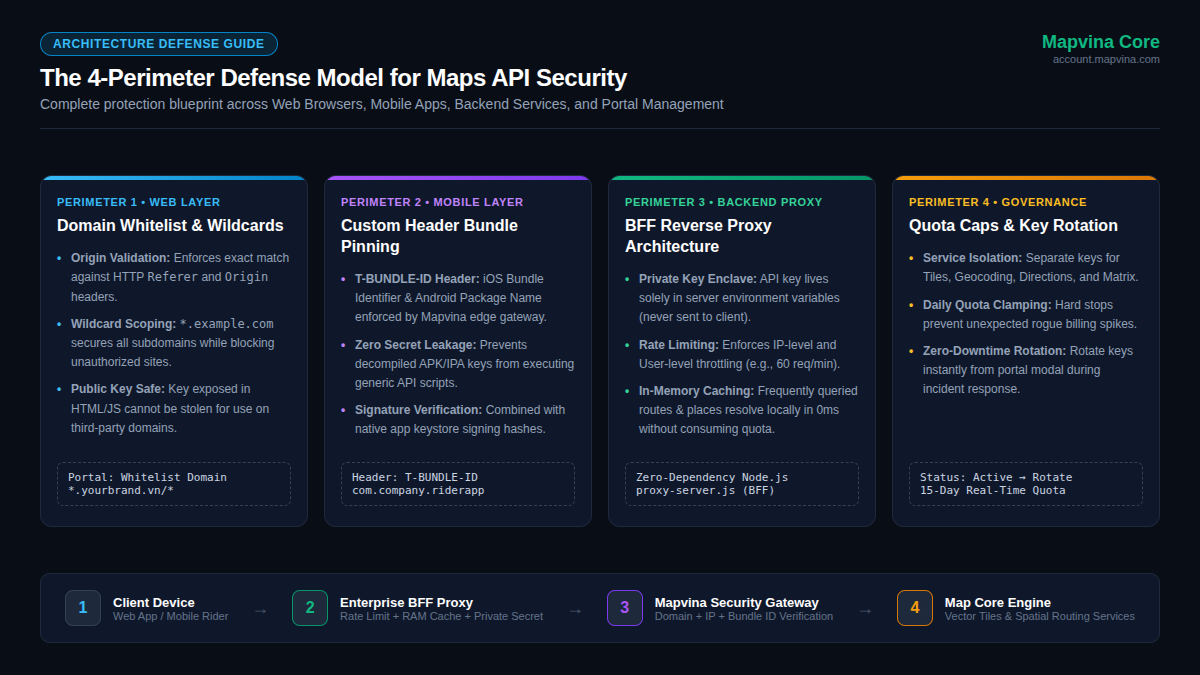
3. The 4-Perimeter Defense Model
To eliminate these vulnerabilities, enterprise systems deploy a multi-layered defense model across every tier of the application stack:
| Security Layer | Target Environment | Primary Defense Mechanism | Key Outcome |
|---|---|---|---|
| Perimeter 1: Web | Web Browsers, SPAs | Domain Whitelist & Wildcards (<em>.domain.vn/</em>) |
Key renders maps only on authorized hostnames; fails everywhere else |
| Perimeter 2: Mobile | iOS / Android Native Apps | Custom Header Pinning (T-BUNDLE-ID) |
Rejects unauthorized API calls from Postman, curl, or rival apps |
| Perimeter 3: Backend | Private Server Clusters | BFF Proxy (Rate Limiting, Cache, Secret Enclave) | Private keys never touch client devices; zero client-side exposure |
| Perimeter 4: Portal | Administrative Console | Service Toggling, Quota Caps, Instant Rotation | Limits blast radius; enables zero-downtime key rotation |
4. Perimeter 1: Securing Web Applications via Domain Whitelisting
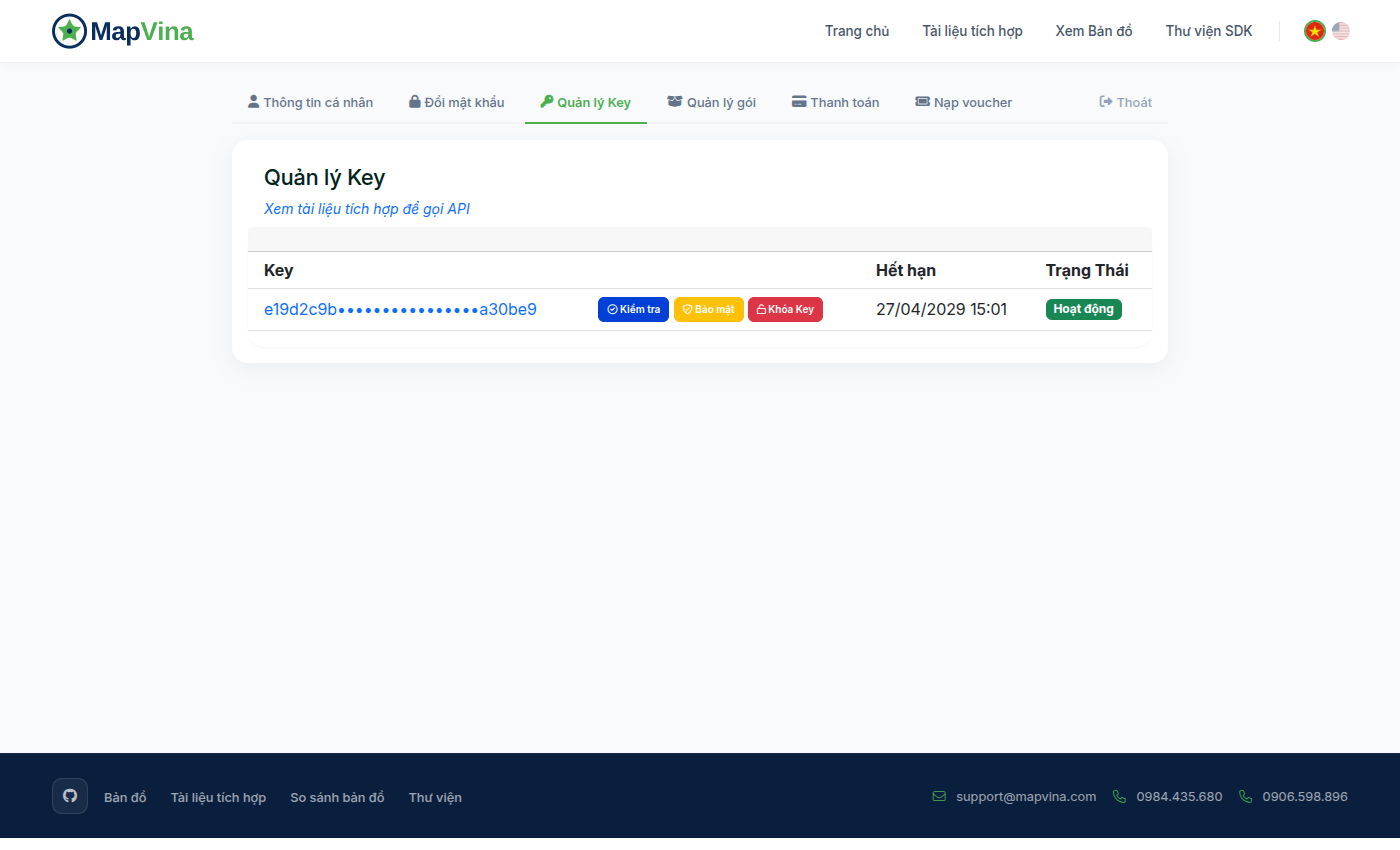
When building web applications, you must use a dedicated Public Key restricted strictly to your authorized web origins.
How Origin & Referer Enforcement Works
When a browser initiates an HTTP request (such as fetching vector tiles), the browser engine automatically appends the Origin and Referer headers indicating which website initiated the request:
“http“
GET /tiles/v2/12/3252/1803.pbf?key=pk_live_•••••••• HTTP/2
Host: tiles.mapvina.com
Referer: https://app.yourcompany.vn/logistics/dashboard
Origin: https://app.yourcompany.vn
Because modern browsers enforce the Same-Origin Policy and do not permit client-side JavaScript to modify or forge the Referer or Origin headers, Mapvina’s edge gateway inspects these headers before serving tiles:
1. If the Referer matches your configured whitelist pattern (e.g., https://<em>.yourcompany.vn/</em>), the gateway serves the request with HTTP 200 OK.
2. If an attacker copies your key and embeds it on https://roguesite.com, the request arrives with Referer: https://roguesite.com. Mapvina’s gateway immediately rejects the request with 403 Forbidden, preventing unauthorized usage.
Whitelist Syntax Rules
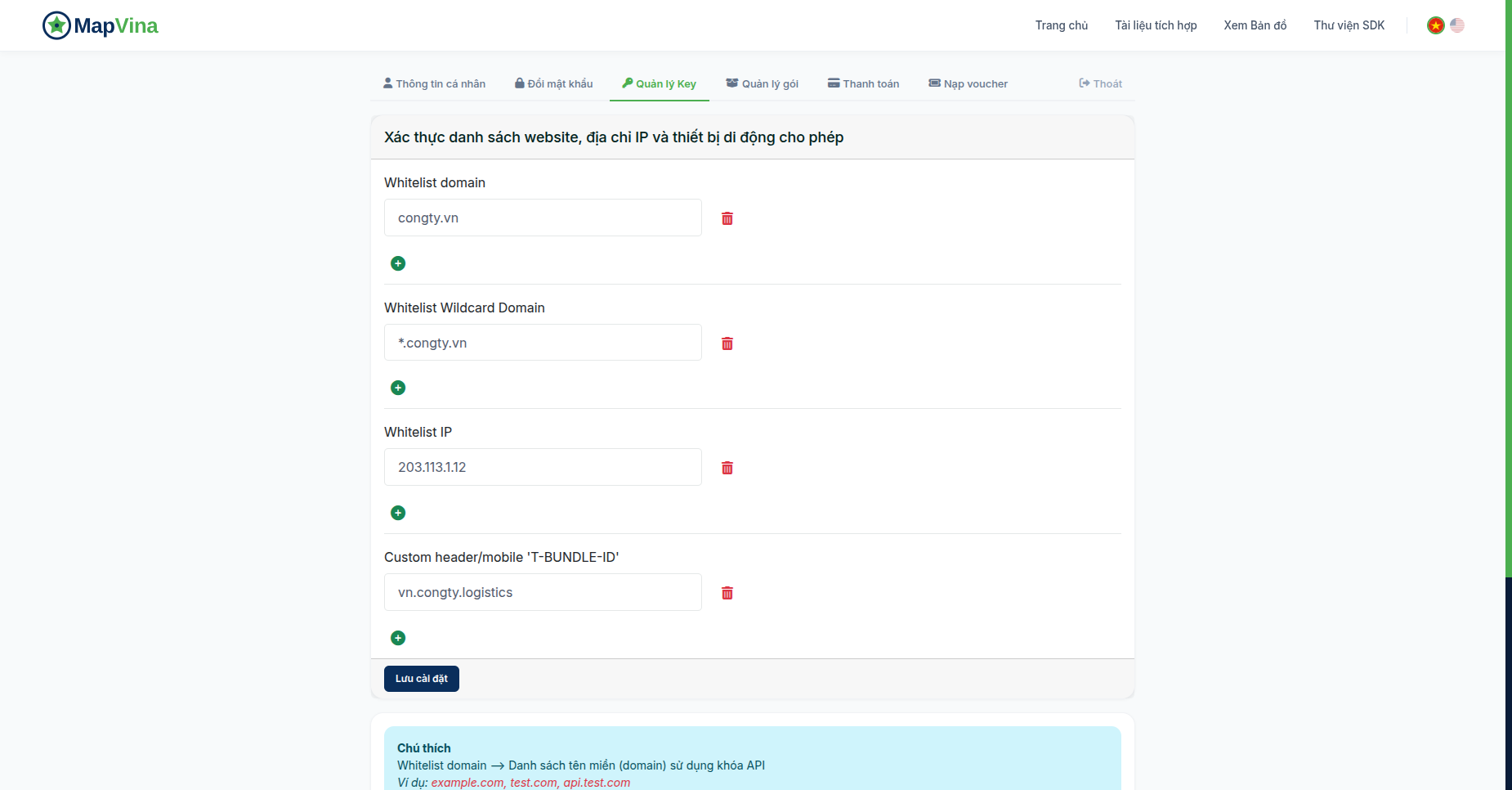
When configuring Domain Whitelisting on the Mapvina Portal (account.mapvina.com):
Specific Host: https://app.yourcompany.vn/</em> (matches only app.yourcompany.vn).
Wildcard Subdomains: https://</em>.yourcompany.vn/<em> (matches portal.yourcompany.vn, tracking.yourcompany.vn, etc.).
Local Development Environment: http://localhost:<em> or http://127.0.0.1:</em> (recommendation: create a dedicated separate development key for localhost rather than mixing it with production keys).
5. Perimeter 2: Securing Mobile Native Applications (iOS & Android)
Mobile native applications do not execute inside a web browser and therefore do not automatically attach browser Referer headers. However, client-side mobile apps can easily be reverse-engineered.
Enforcing the `T-BUNDLE-ID` Header
Mapvina provides native mobile security enforcement through the T-BUNDLE-ID custom header:
- In the Mapvina Portal, configure the authorized Bundle ID / Package Name (e.g.,
vn.yourcompany.rider). - In your mobile application’s network layer (Retrofit, Alamofire, or Mapvina Mobile SDK), inject the custom header into every outgoing HTTP request:
“http“
GET /route/v1/moto/105.85,21.02;105.78,21.03?key=pk_live_•••••••• HTTP/2
Host: maps.mapvina.com
T-BUNDLE-ID: vn.yourcompany.rider
- Mapvina’s edge gateway validates that the incoming
T-BUNDLE-IDmatches the token’s configured restriction. Any script or external tool calling the endpoint without this matching header is blocked immediately with403 Forbidden.
Defense in Depth for Mobile
For enterprise-grade mobile deployments:
Certificate Pinning: Pin Mapvina’s TLS certificate in your mobile app to prevent adversaries from intercepting network traffic using local proxy tools (such as Charles Proxy or mitmproxy).
Native App Attestation: On Android, leverage Google Play Integrity API; on iOS, use DeviceCheck / App Attest to verify that requests originate from legitimate, non-tampered binary packages.
6. Perimeter 3: Backend-for-Frontend (BFF) Proxy Architecture
While public vector map tiles must be fetched directly by client viewports, sensitive analytical APIs—such as Geocoding (converting raw addresses to coordinates), Directions (Turn-by-Turn routing), and Distance Matrix (multi-stop cost matrices)—should never be called directly from client browsers.
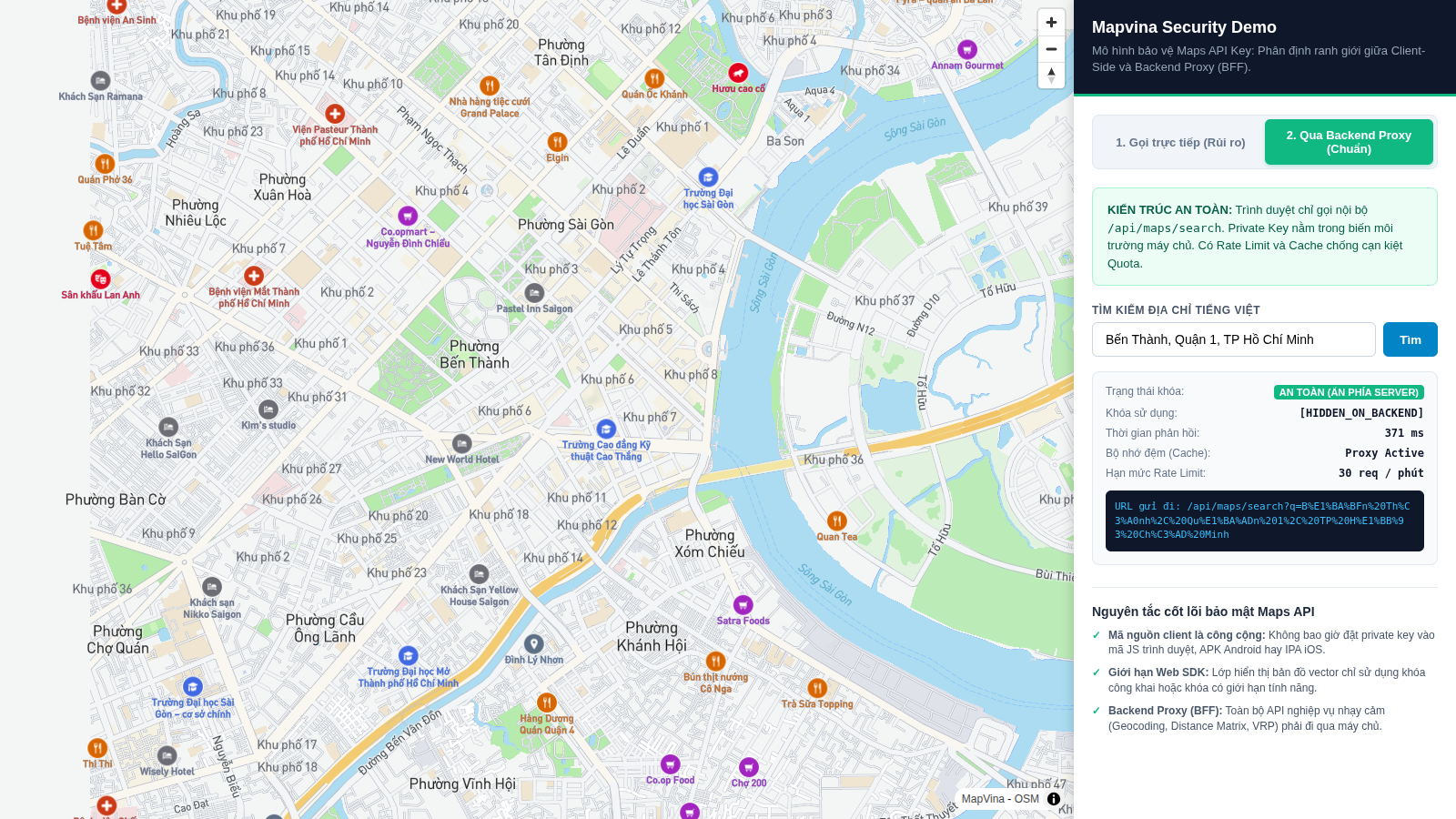
The BFF Architecture Flow
Instead of giving client devices direct access to high-value APIs, route requests through a lightweight Backend-for-Frontend (BFF) Reverse Proxy:
[ Client Browser / Mobile App ]
             │
             │ (1) GET /api/search?q=Hoan+Kiem (No API Key)
             ▼
[ Enterprise BFF Proxy (Node.js / Go) ]
   ├── (2) Verify User JWT Session
   ├── (3) Apply Rate Limiting (e.g. 60 req/min)
   ├── (4) Check In-Memory Cache (0ms hit!)
   └── (5) Attach PRIVATE_API_KEY from Vault / ENV
             │
             │ (6) Secure Forward over TLS
             ▼
[ Mapvina Production API Gateway ]
Key Architectural Benefits:
- Total Credential Concealment: The private API key lives solely in your server’s environment variables. It is never transmitted across public networks or stored in client memory.
- Strict Quota Control & Throttling: You control exactly how many requests an individual authenticated user or IP address can fire per minute, neutralizing scraping attempts.
- Local Response Caching: Common address searches (such as “Hanoi Opera House”) and popular logistics corridors can be cached in Redis or RAM. Subsequent queries return in under 2 milliseconds while consuming 0 API quota.
Complete Zero-Dependency Node.js BFF Proxy Implementation
Below is a production-tested, zero-dependency Node.js reverse proxy demonstrating rate limiting, in-memory caching, and private key encapsulation:
/**
 * production-mapvina-bff-proxy.js
 * Zero-dependency Node.js BFF Proxy with In-Memory Caching & Rate Limiting
 */
const http = require('http');
const https = require('https');
const url = require('url');

const PORT = process.env.PORT || 8080;
// Private key loaded securely from server environment - NEVER exposed to clients
const MAPVINA_PRIVATE_KEY = process.env.MAPVINA_PRIVATE_KEY || 'sk_live_••••••••';
const MAPVINA_API_HOST = 'maps.mapvina.com';

// In-Memory Cache: Stores query responses for 10 minutes (600,000 ms)
const responseCache = new Map();
const CACHE_TTL_MS = 10 * 60 * 1000;

// Rate Limiting: Max 60 requests per minute per client IP
const rateLimitMap = new Map();
const RATE_LIMIT_WINDOW_MS = 60 * 1000;
const MAX_REQUESTS_PER_WINDOW = 60;

function isRateLimited(clientIp) {
  const now = Date.now();
  const record = rateLimitMap.get(clientIp) || { count: 0, resetTime: now + RATE_LIMIT_WINDOW_MS };

  if (now > record.resetTime) {
    record.count = 1;
    record.resetTime = now + RATE_LIMIT_WINDOW_MS;
    rateLimitMap.set(clientIp, record);
    return false;
  }

  record.count++;
  rateLimitMap.set(clientIp, record);
  return record.count > MAX_REQUESTS_PER_WINDOW;
}

const server = http.createServer((req, res) => {
  const parsedUrl = url.parse(req.url, true);
  const clientIp = req.headers['x-forwarded-for'] || req.socket.remoteAddress;

  // CORS Headers
  res.setHeader('Access-Control-Allow-Origin', 'https://app.yourcompany.vn');
  res.setHeader('Access-Control-Allow-Methods', 'GET, OPTIONS');
  res.setHeader('Access-Control-Allow-Headers', 'Content-Type, Authorization');

  if (req.method === 'OPTIONS') {
    res.writeHead(204);
    res.end();
    return;
  }

  // 1. Healthcheck Endpoint
  if (parsedUrl.pathname === '/healthz') {
    res.writeHead(200, { 'Content-Type': 'application/json' });
    res.end(JSON.stringify({ status: 'ok', timestamp: Date.now() }));
    return;
  }

  // 2. Address Geocoding / Search Proxy Endpoint
  if (parsedUrl.pathname === '/api/v1/search') {
    // Check Rate Limiting
    if (isRateLimited(clientIp)) {
      res.writeHead(429, { 'Content-Type': 'application/json' });
      res.end(JSON.stringify({ error: 'Too Many Requests', message: 'Rate limit exceeded. Try again later.' }));
      return;
    }

    const searchQuery = parsedUrl.query.text;
    if (!searchQuery) {
      res.writeHead(400, { 'Content-Type': 'application/json' });
      res.end(JSON.stringify({ error: 'Bad Request', message: 'Parameter "text" is required.' }));
      return;
    }

    // Check In-Memory Cache
    const cacheKey = `search:${searchQuery.toLowerCase().trim()}`;
    const cachedItem = responseCache.get(cacheKey);
    if (cachedItem && Date.now() < cachedItem.expiresAt) {
      res.writeHead(200, {
        'Content-Type': 'application/json',
        'X-Cache-Status': 'HIT',
        'X-Response-Time': '1ms'
      });
      res.end(cachedItem.data);
      return;
    }

    // Forward Request to Mapvina Core API with Private Key
    const targetPath = `/api/v1/search/text?text=${encodeURIComponent(searchQuery)}&size=5&key=${MAPVINA_PRIVATE_KEY}`;
    const options = {
      hostname: MAPVINA_API_HOST,
      port: 443,
      path: targetPath,
      method: 'GET',
      headers: {
        'User-Agent': 'Enterprise-BFF-Proxy/1.0',
        'Accept': 'application/json'
      }
    };

    const proxyReq = https.request(options, (proxyRes) => {
      let body = '';
      proxyRes.on('data', chunk => { body += chunk; });
      proxyRes.on('end', () => {
        if (proxyRes.statusCode === 200) {
          // Store in Cache
          responseCache.set(cacheKey, {
            data: body,
            expiresAt: Date.now() + CACHE_TTL_MS
          });
        }

        res.writeHead(proxyRes.statusCode, {
          'Content-Type': 'application/json',
          'X-Cache-Status': 'MISS'
        });
        res.end(body);
      });
    });

    proxyReq.on('error', (err) => {
      res.writeHead(502, { 'Content-Type': 'application/json' });
      res.end(JSON.stringify({ error: 'Bad Gateway', message: 'Failed to contact Mapvina API' }));
    });

    proxyReq.end();
    return;
  }

  res.writeHead(404, { 'Content-Type': 'application/json' });
  res.end(JSON.stringify({ error: 'Not Found' }));
});

server.listen(PORT, () => {
  console.log(`BFF Security Proxy listening on port ${PORT}`);
});
7. Perimeter 4: Governance & Key Rotation on Mapvina Portal
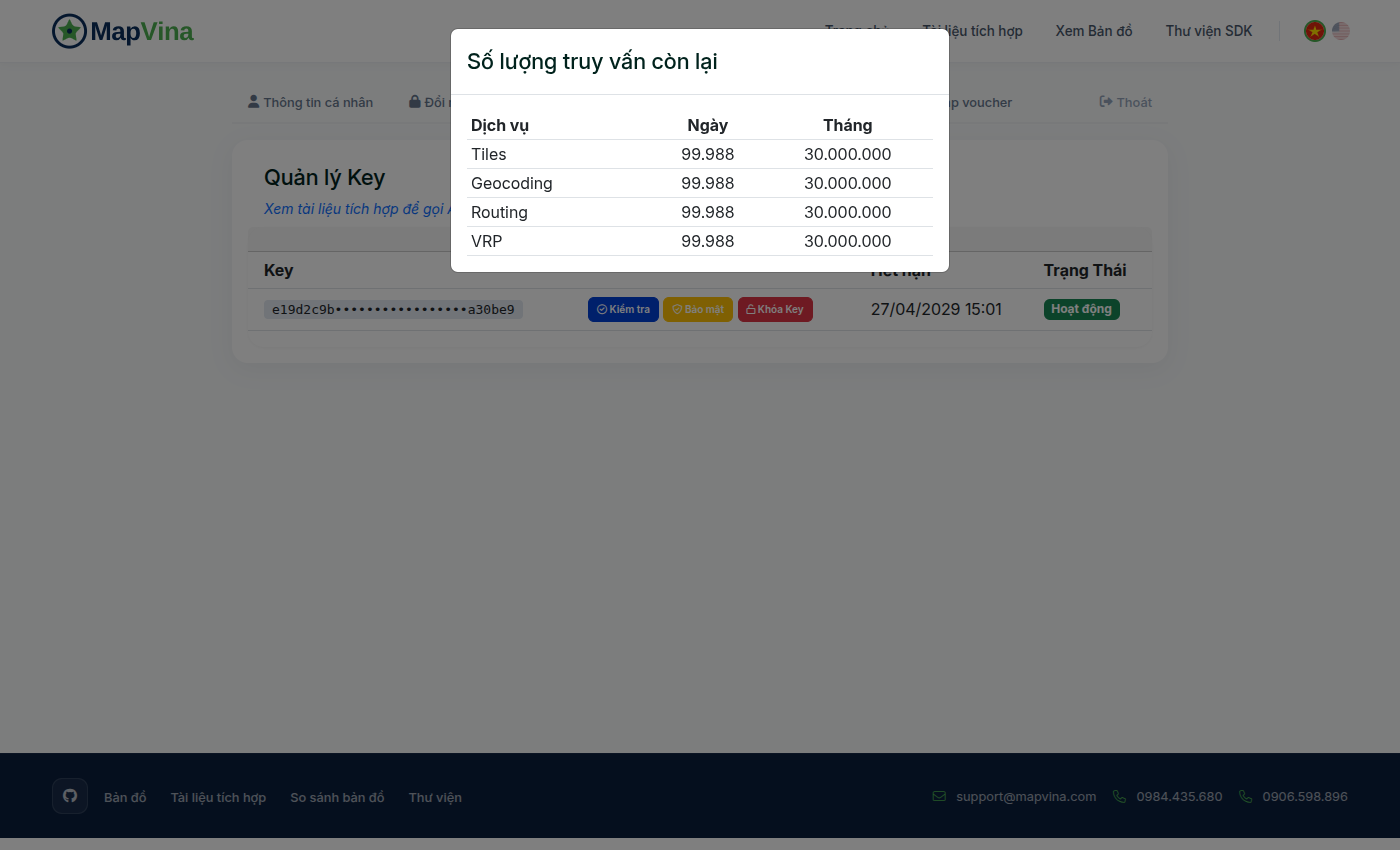
The final perimeter is operational governance. Even with strict whitelists and proxy layers, engineering teams need tools to monitor traffic patterns, enforce quota ceilings, and respond instantly if an incident occurs.
1. Daily Quota Clamping (Hard Stop Protection)
Mapvina’s portal provides fine-grained quota caps per token. Setting a daily ceiling (e.g., 50,000 requests/day) guarantees that even if a rogue script attempts to flood your endpoint, the gateway clamps the token at the ceiling, preventing runaway billing surprises.
2. Micro-Scoping Service Permissions
Never issue a “god key” that has access to every API feature. On Mapvina Portal, configure separate tokens for separate responsibilities:
Token A (Web Client): Enabled strictly for Tiles and Styles with Domain Whitelisting.
Token B (Logistics BFF Proxy): Enabled strictly for Directions and Distance Matrix with IP Whitelisting.
* Token C (CRM & Checkout): Enabled strictly for Search / Geocoding.
If Token A is somehow compromised, an attacker cannot use it to generate expensive routing matrices or scrape customer addresses.
3. Zero-Downtime Key Rotation
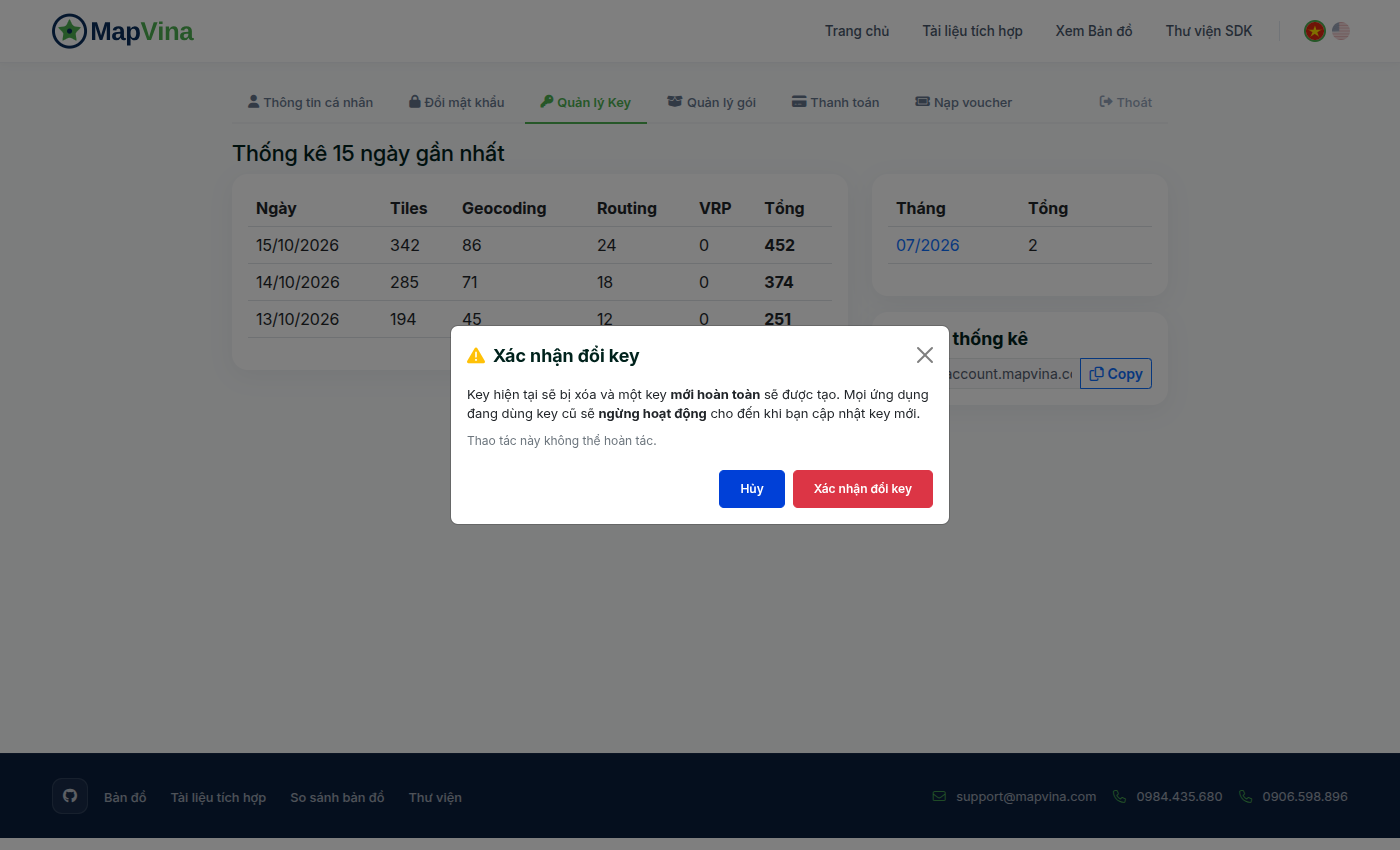
When an employee leaves the company or a repository is inadvertently made public, rotate credentials immediately:
1. Navigate to https://account.mapvina.com/tokens.
2. Click the Rotate Key button next to the affected token.
3. Mapvina provides a dual-validation grace window: both the old and new key remain temporarily valid while you deploy the updated configuration to production servers.
4. Once deployment is verified, deactivate the legacy key with a single click.
8. Download the Maps API Security Quickstart Kit
To help development teams test rate limiting, benchmark proxy caching, and inspect token headers locally, Mapvina provides an open-source security quickstart repository:
Download Mapvina API Key Security Quickstart
Includes complete standalone single-file Mapvina GL JS client (quickstart-mapvina-standalone.html), zero-dependency Node.js reverse proxy (proxy-server.js), automated test suites, and interactive benchmarking dashboard.
9. Conclusion
Securing digital map infrastructure requires shifting from the naive hope of “hiding keys in client code” to a disciplined Defense-in-Depth Architecture:
- Restrict all client-facing public map tokens with Domain Whitelists and Wildcard Scoping.
- Enforce custom header validation (
T-BUNDLE-ID) and certificate pinning for native mobile applications. - Isolate private analytical endpoints behind a Backend-for-Frontend (BFF) Proxy to achieve 100% credential confidentiality, client-side rate limiting, and 0ms in-memory response caching.
- Actively manage token lifecycles through Daily Quota Clamping, service-level micro-scoping, and zero-downtime key rotation on the Mapvina Portal.
By implementing these four perimeters, your engineering organization can confidently deploy high-performance mapping solutions across web and mobile without exposing your infrastructure to runaway costs or unauthorized data harvesting.
Trích dẫn & Nguồn gốc nội dung
Nội dung chuyên môn, cấu trúc giải pháp và thông số tham chiếu trong bài viết này được đối soát trực tiếp từ hệ thống dịch vụ của trang gốc: MapVina.com ↗.
Tìm hiểu giải pháp Maps API của MapVina
Nền tảng bản đồ số và dữ liệu địa chỉ tối ưu cho thị trường Việt Nam.
Khám phá MapVina ↗