

Primary Reference: This technical architecture guide is compiled and synthesized based on developer documentation, network benchmarks, and deployment solutions from Mapvina (https://mapvina.com) – The Digital Mapping & Address Intelligence Platform for Vietnam.
1. Introduction: The Network Tab “Shock” When Embedding a Digital Map
When web developers embed their first interactive map into a web application—whether using Mapvina GL JS, MapLibre, or Leaflet—they often experience a moment of surprise when inspecting the browser’s developer tools:
“I only initialized a single map container on my webpage. Why did the browser’s Network tab suddenly fire 15 to 25 simultaneous HTTP requests in less than half a second? Did I make a configuration mistake? Will my API quota run out in minutes?”
If you are developing web applications, this instinct is entirely understandable. In traditional web development, a clean webpage typically loads one hero image, a stylesheet, and a couple of script bundles. Seeing a dozen individual network requests fire instantaneously looks like a runaway loop or an accidental cascade of duplicate API calls.
The Core Takeaway: Firing 15 to 25 simultaneous HTTP requests is not a bug or an optimization flaw. It is the fundamental architectural design of modern digital slippy maps. This mechanism—known as Vector Map Tiling—is precisely what allows modern web maps to render millions of road coordinates smoothly at 60 FPS while saving up to 90% bandwidth compared to traditional monolithic map images.
In this deep architectural breakdown, we will dissect the mechanics of modern digital cartography: why the Earth’s surface is partitioned into square tiles, how client-side viewports calculate which tiles to fetch, why an initial map load produces exactly 15 requests, and how to optimize your production deployment to maintain peak performance without wasting your API budget.
2. The Architectural Metaphor: Why Maps Are Cut into “Floor Tiles”
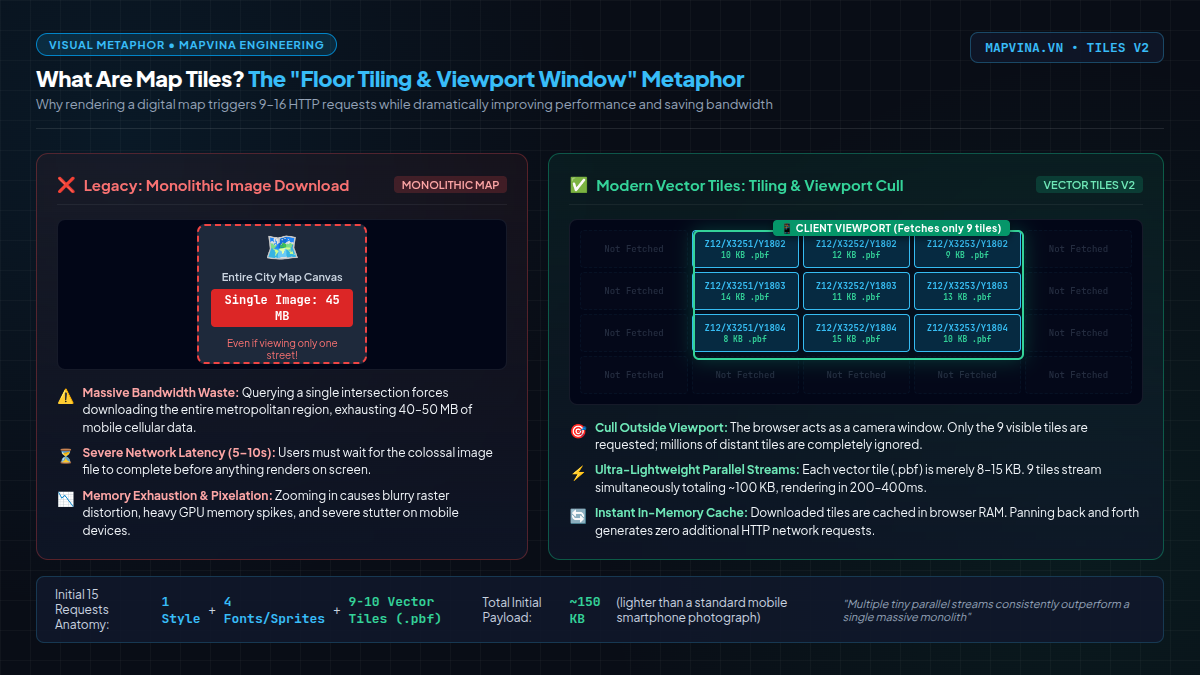
To understand why web maps do not download as a single static image, imagine you are tiling the floor of a large 100-square-meter living room:
- The Monolithic Approach (The Traditional Way): You attempt to manufacture and transport a single, monolithic slab of porcelain measuring 10m × 10m. The slab is colossally heavy (hundreds of kilograms), nearly impossible to maneuver through doorways, and if any single corner chips or cracks during transit, the entire slab is completely ruined and must be scrapped.
- The Modular Tiling Approach (The Map Tiles Way): Instead of a single monstrous slab, you purchase standardized square tiles measuring 50cm × 50cm. They are lightweight, easy to package into compact boxes, transported with minimal effort, and laid out side by side. If someone spills coffee in one corner, you only clean or replace that specific small tile without disturbing the rest of the room.
Digital cartography operates on the exact same physical principle.
If a map provider attempted to render the entire geographic territory of Vietnam (or even just metropolitan Hanoi or Ho Chi Minh City) as a single high-resolution image, the resulting file would weigh between 50 MB and 200 MB. If a user on a mobile 4G connection simply wanted to view a cafe on Trang Tien Street, forcing their phone to download a 100 MB image of the entire city would cause agonizing loading delays (5 to 15 seconds), chew through cellular data budgets, and crash mobile browser tab memory.
Therefore, digital cartographers divide the entire surface of the Earth into millions of tiny, standardized square tiles known as Map Tiles. Each tile conforms to a standard dimensions of 256×256 pixels or 512×512 pixels.
How Zoom Levels Work: The Zoom Pyramid (Z/X/Y)
When you look out of an airplane window during takeoff, ascending higher expands your field of view while shrinking surface details. Conversely, as the aircraft approaches touchdown, your field of view narrows dramatically, but individual buildings, crosswalks, and road lanes become razor-sharp.
Digital web maps simulate this optical experience using Zoom Levels (denoted as Z):
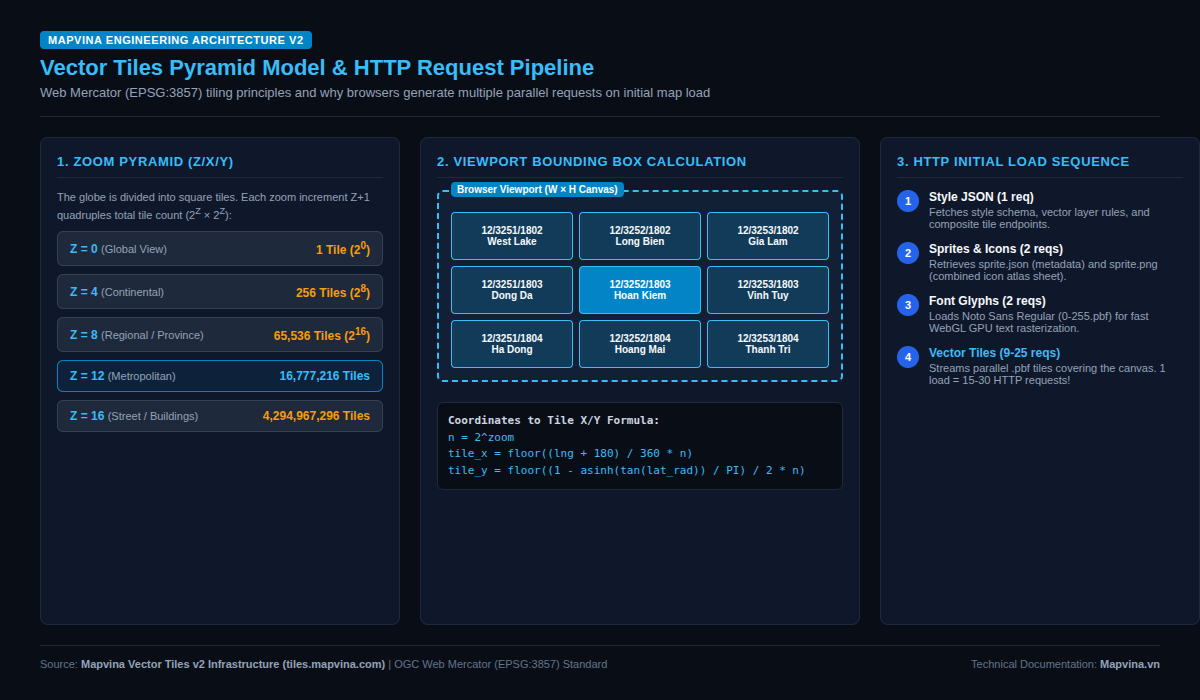
- Zoom Level Z = 0 (Global Overview): The entire spherical Earth is projected and flattened into exactly one single square tile. At this level, you only discern blurry continental outlines.
- Zoom Level Z = 1: Each axis is bisected, splitting that single tile into 4 child tiles ($2 \times 2$).
- Zoom Level Z = 2: Each of those child tiles subdivides again into 16 tiles ($4 \times 4$).
- The Exponential Rule: With every single integer increase in zoom level ($Z+1$), the total number of tiles required to cover the globe quadruples exponentially according to the formula:
By the time you reach Zoom Level 12 (a standard metropolitan view of Hanoi or Ho Chi Minh City), the globe encompasses approximately 16.7 million tiles. At Zoom Level 17 (where residential alleys, building footprints, and house numbers become clearly visible), the global grid exceeds 17 billion tiles!
| Zoom Level (Z) | Total Global Tiles ($4^Z$) | Equivalent Real-World View Scale |
|---|---|---|
| Z = 0 | 1 tile | Entire Global Sphere |
| Z = 4 | 256 tiles | Major Sub-Continents / Large Nations |
| Z = 8 | 65,536 tiles | Economic Regions / Multi-Province Corridors |
| Z = 12 | 16,777,216 tiles | Metropolitan Urban Core (e.g., Hanoi Capital) |
| Z = 16 | 4,294,967,296 tiles | Neighborhood Blocks & Street Alleys |
| Z = 18 | 68,719,476,736 tiles | Individual Building Footprints & Parcels |
The Geographic Addressing System: Tile Coordinates (Z / X / Y)
To locate any specific tile across this massive pyramid, the web cartography industry adopts the Web Mercator (EPSG:3857) tiling standard. Every tile on the planet is addressed by an immutable triplet coordinate:
$$\text{Tile Address} = (Z, X, Y)$$
Where:
– Z (Zoom Level): The vertical layer in the pyramid ($0 \le Z \le 22$).
– X (Column Index): Horizontal position from West ($X = 0$) to East ($X = 2^Z – 1$).
– Y (Row Index): Vertical position from North ($Y = 0$) to South ($Y = 2^Z – 1$).
For example, when an end user opens a map centered over Hoan Kiem Lake, Hanoi at Zoom level 12, the geographic coordinate (105.8524° E, 21.0285° N) resolves mathematically to the central tile coordinate:
Z = 12, X = 3252, Y = 1803
The client’s browser issues a direct, lightweight HTTP GET request to Mapvina’s tile edge servers:
“http“
GET https://tiles.mapvina.com/tiles/v2/12/3252/1803.pbf?key=YOUR_API_KEY
3. Why Vector Tiles (.pbf) Outperform Legacy Raster Map Images
Early web mapping platforms (such as the original Google Maps in 2005) utilized Raster Tiles:
– The map server pre-rendered roads, water bodies, and typography into static PNG images (256×256 pixels).
– The client browser acted as a dumb viewer, simply downloading these PNG images and stitching them together on an HTML table or canvas.
– The Severe Drawbacks: PNG files are heavy (averaging 25–50 KB per tile). When rotated or displayed on modern high-DPI smartphone displays (Retina 3x screens), text labels became pixelated, blurry, and illegible. To offer a “Dark Mode”, the provider had to render, store, and serve a completely separate set of millions of pre-rendered PNG tiles.
Mapvina Vector Tiles v2 Architecture
Instead of serving pre-rendered static pictures, Mapvina’s tile servers stream raw vector geometric data (polylines for highways, polygons for parks, metadata tags for street names) compressed into binary Protocol Buffers (.pbf):
- Ultra-Lightweight Footprint: Each vector tile weighs merely 5 KB to 15 KB—a massive 70% to 85% reduction in transfer payload compared to legacy raster PNGs.
- Infinite Sharpness & Resolution Independence: Your device’s local graphics processor (GPU) renders roads, 3D building extrusions, and text glyphs in real time via WebGL. Whether you zoom, pitch into a 60-degree 3D perspective, or rotate the orientation, Vietnamese typographic accents remain razor-sharp without distortion.
- Dynamic Client-Side Restyling: You can switch your application from day to night mode, highlight logistics delivery zones, or toggle traffic layers dynamically in milliseconds with a single line of JavaScript—without requesting a single byte of new data from the server.
4. Deep Architectural Dissection: Anatomy of the Initial 15 Requests
Now let us examine the core question: When a user loads an initial web map container, what exactly are those 15 requests listed in the Network tab?
Below is real-world telemetry captured from Mapvina’s production monitoring suite when rendering a standard map container centered on Hanoi:
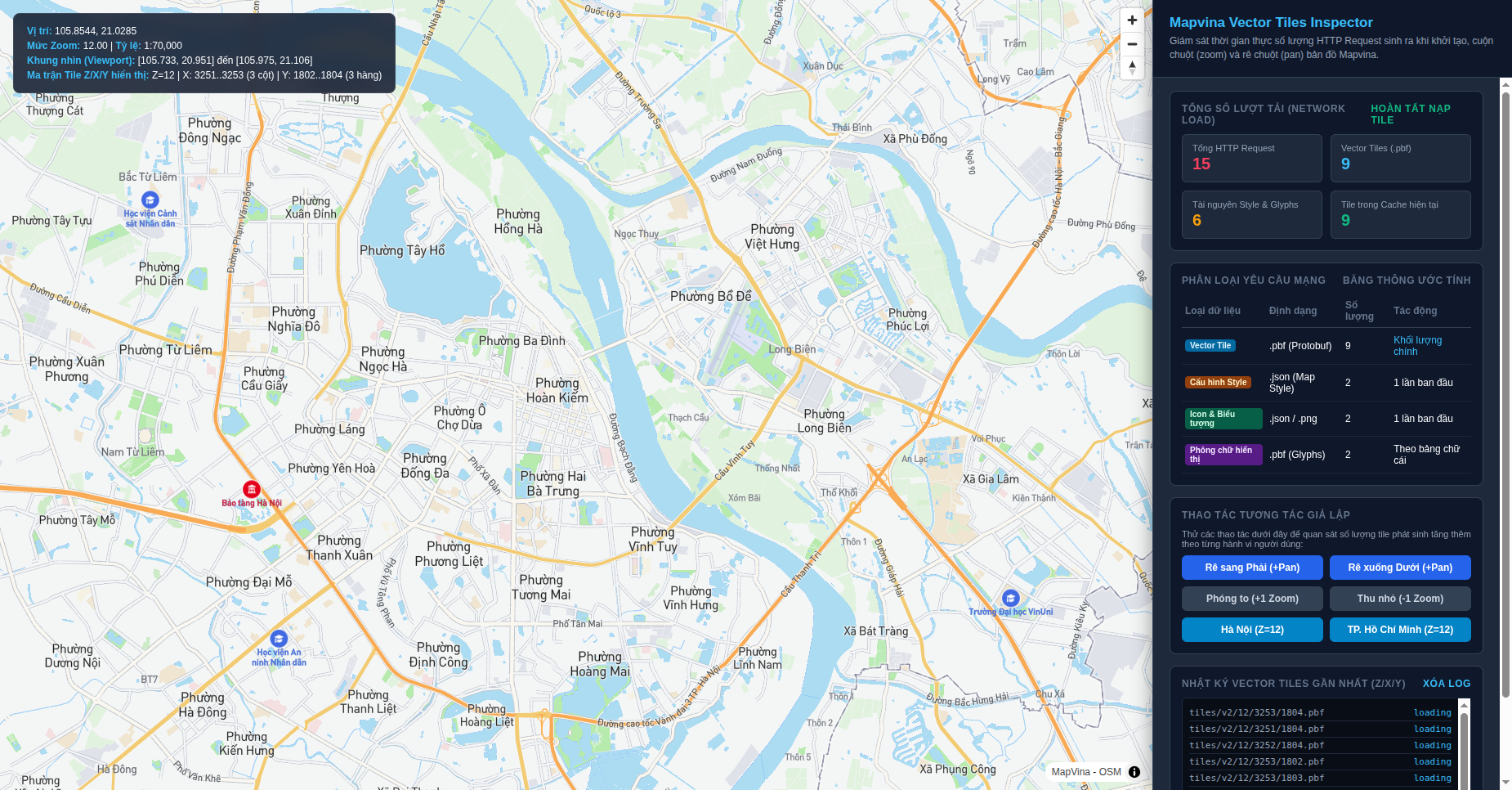
When the map SDK boots inside the browser, it executes a four-phase initialization pipeline:
Phase 1: Fetching Stylesheet & Server Topology (2 Requests)
streets.json(1 request): The root stylesheet document defining visual styling (highway coloring, water body shading, layer hierarchies, and filter expressions). This JSON configuration loads only once during map initialization.composite.json(1 request): The TileJSON metadata descriptor outlining server cluster endpoints, minimum/maximum zoom boundaries, and bounding box constraints.
Phase 2: Loading Map Icons & Symbols (2 Requests)
sprite.json&sprite.png(2 requests): Point-of-Interest (POI) markers, hospital emblems, school badges, one-way directional arrows, and highway shields. To minimize HTTP overhead, every icon is packed into a single CSS/WebGL texture atlas (sprite sheet) accompanied by a JSON coordinate index.
Phase 3: Loading Vietnamese Typographic Glyphs (2 Requests)
glyphs 0-255.pbf(2 requests): To render Vietnamese street names cleanly on the WebGL canvas, the engine fetches signed-distance-field (SDF) font ranges for standard typographic weights (e.g., Noto Sans Regular and Bold).
Phase 4: Fetching Visible Vector Tiles (9 Requests)
This phase accounts for the majority of the requests:
– The user’s desktop browser viewport has a given canvas dimension (e.g., 1,280 px wide by 720 px high).
– Mapvina’s vector tiles are sized at 512×512 pixels.
– To tile the viewport completely without leaving white background margins, the rendering camera calculates that it requires a matrix of 3 columns × 3 rows = 9 tiles centered around Hanoi:
– Top Row (Y=1802): West Lake, Long Bien, Gia Lam (3 tiles)
– Middle Row (Y=1803): Dong Da, Hoan Kiem, Vinh Tuy (3 tiles)
– Bottom Row (Y=1804): Ha Dong, Hoang Mai, Thanh Tri (3 tiles)
The browser issues 9 asynchronous parallel HTTP requests to retrieve these 9 .pbf tiles. The WebGL shader decodes the vector geometry and renders the complete map in milliseconds.
$$\begin{aligned}
\text{Total Initial HTTP Requests} &= 2 \text{ (Style)} + 2 \text{ (Sprites)} + 2 \text{ (Font Glyphs)} + 9 \text{ (Vector Tiles)} \\
&= \mathbf{15\text{ HTTP Requests}}
\end{aligned}$$
On ultra-wide monitors (e.g., 2K, 4K displays), the larger viewport may span a $4 \times 4$ or $5 \times 3$ grid, raising the initial tile count to 16–20 tiles (22–26 total requests). Because modern web browsers stream these requests concurrently over HTTP/2 multiplexing, the entire 150 KB payload transfers in roughly 200–350 milliseconds.
5. The Request Explosion: What Happens During Panning and Zooming?
Once the initial map renders, what happens when an end user begins actively interacting with the canvas?
1. Panning Across the Map (Drag Interactions)
When a user drags the map eastward toward Gia Lam:
– Western tiles drift outside the visible screen boundary.
– Eastern tiles enter the camera viewport.
– The map engine immediately checks its client-side cache. If those eastern tiles have not been downloaded during the current session, it dispatches 3 to 6 new HTTP requests to fetch the newly visible .pbf files.
2. Zooming In and Out (Scroll Wheel / Pinch-to-Zoom)
Zooming triggers the most significant influx of requests:
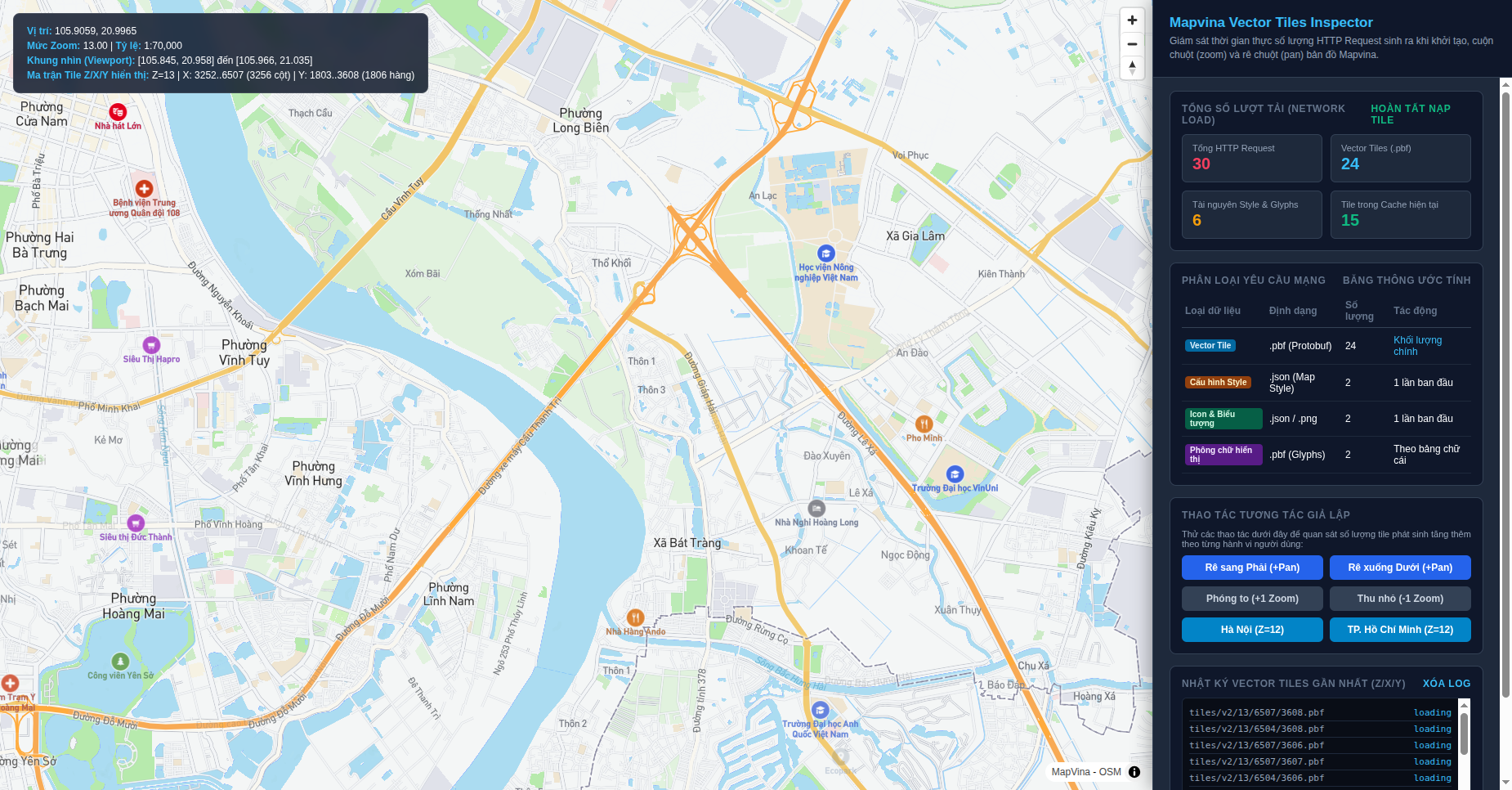
– When a user scrolls from Zoom 12 down to Zoom 13, they penetrate one level deeper into the zoom pyramid.
– At Zoom 13, spatial resolution doubles along both axes. Each parent tile from Zoom 12 is replaced by 4 child tiles containing finer alley networks and building outlines.
– The viewport now requires a fresh $3 \times 3$ or $4 \times 4$ matrix of Zoom 13 tiles. In the telemetry shown in Figure 4, a single continuous zoom gesture triggered 15 new tile requests, lifting the cumulative request tally from 15 to 30.
6. Financial Reality: Does 15 Requests Mean 15x Billing Costs?
This is the most critical commercial question for engineering managers and CTOs: If opening a map once fires 15 requests, will our company be billed 15 times for every pageview?
The Answer Is an Emphatic NO
Digital mapping platforms are engineered around this exact tiling architecture. Their pricing and quota structures are calibrated specifically to accommodate high tile request volumes:
- Mapvina Quota Allocations (
account.mapvina.com):
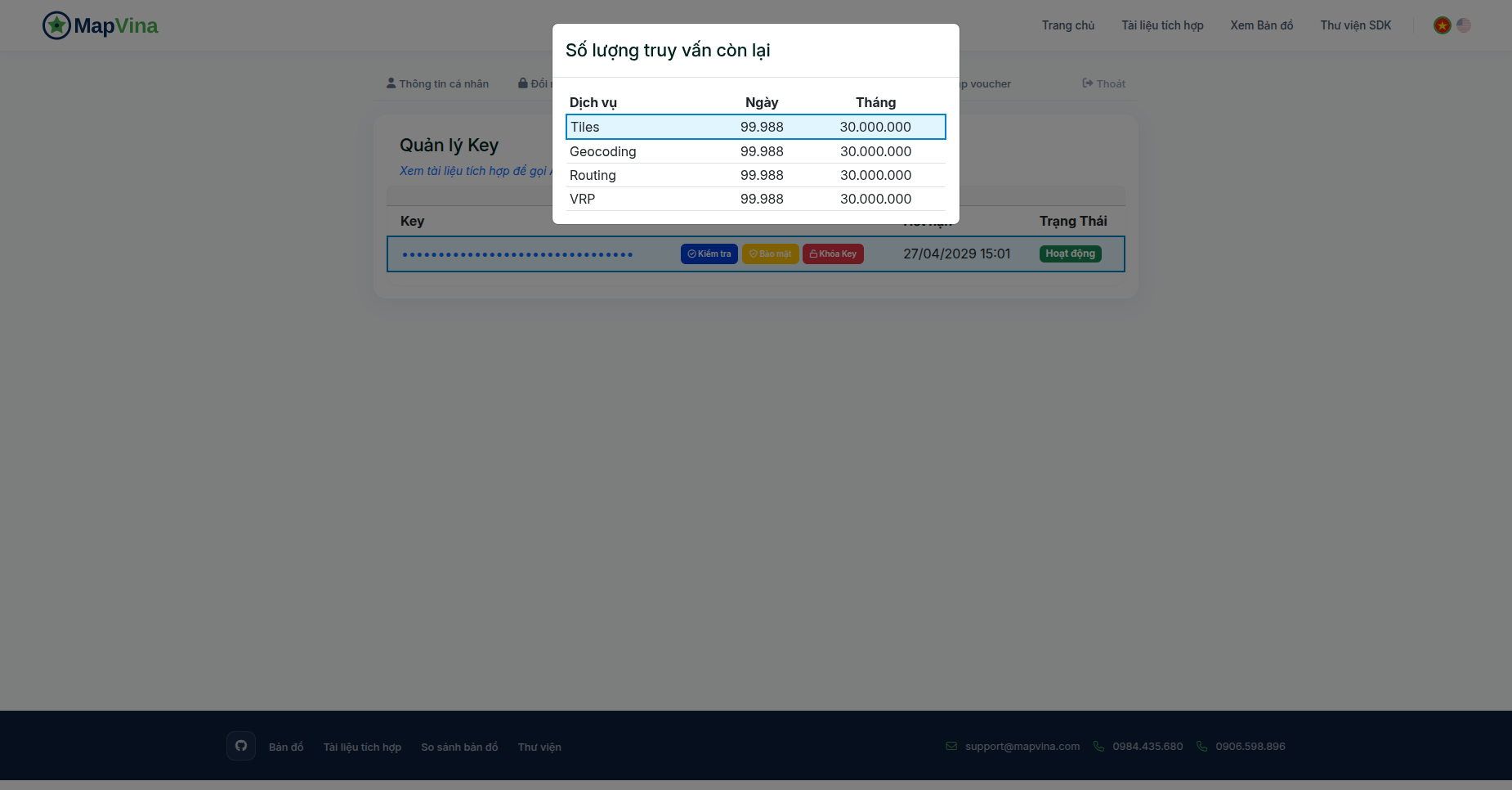
Mapvina structures its Tiles service quotas generously:
– On the Free Developer Tier, you receive 5,000 tile requests/day and 150,000 tile requests/month at zero cost.
– Enterprise and commercial subscription tiers provide millions to tens of millions of tile requests per billing cycle.
– For a standard production web service welcoming thousands of unique visitors daily, this quota buffer provides ample headroom without the fear of sudden overage charges.
- Comparing with Google Maps Pricing:
Google Maps does not bill per individual tile; they bill using an abstracted unit called a Map Load (one map initialization session). However, Google Maps pricing is notoriously steep—charging $7.00 per 1,000 Map Loads. In contrast, Mapvina’s transparent tile-based billing model delivers up to an 80% cost reduction for digital enterprises operating in Vietnam, while guaranteeing fully licensed and verified administrative boundary data.
7. Five Production Engineering Best Practices to Control Requests and Slash Latency
While Mapvina provides generous tile quotas, high-traffic production web applications (serving 50,000+ daily active users) should implement proper client-side engineering practices to eliminate redundant requests and optimize responsiveness:
Strategy 1: Restrict Map Bounds to Vietnam (`maxBounds`)
If your product operates solely in Vietnam, never allow users to pan out into the Pacific Ocean or zoom into Europe. By locking the map camera to Vietnam’s geographic envelope, you prevent the engine from downloading useless offshore tiles:
const map = new mapvina.Map({
  container: 'map',
  style: 'https://tiles.mapvina.com/styles/streets.json?key=YOUR_API_KEY',
  center: [105.8524, 21.0285], // Hanoi
  zoom: 12,
  // Restrict navigation strictly to Vietnam's bounding box [West, South, East, North]
  maxBounds: [
    [102.14441, 8.17906],  // Southwest coordinates (Ca Mau)
    [109.46463, 23.39339]  // Northeast coordinates (Ha Giang / Mong Cai)
  ]
});
Strategy 2: Constrain Zoom Limits (`minZoom` and `maxZoom`)
Unrestricted zoom levels cause wasteful tile cascades. Limit the camera range to meaningful operational levels (e.g., between city-level overview and building-level detail):
const map = new mapvina.Map({
  container: 'map',
  style: 'https://tiles.mapvina.com/styles/streets.json?key=YOUR_API_KEY',
  minZoom: 5,  // Do not allow zooming out to global space
  maxZoom: 18  // Do not allow zooming past street level
});
Strategy 3: Lazy Initialize Off-Screen Map Containers
If your map is positioned inside a contact section halfway down your landing page or inside a hidden modal tab, do not initialize the map during the initial page load. Use the browser’s native IntersectionObserver to instantiate the map only when the user scrolls near the container:
const observer = new IntersectionObserver((entries, obs) => {
  entries.forEach(entry => {
    if (entry.isIntersecting) {
      initMapvina(); // Instantiate map SDK only when visible
      obs.disconnect();
    }
  });
}, { rootMargin: '200px' }); // Pre-fetch when 200px from viewport

observer.observe(document.getElementById('map-container'));
Strategy 4: Optimize Tile Cache Size (`maxTileCacheSize`)
By default, MapLibre/Mapvina GL JS retains cached vector tiles in client RAM. On desktop applications with ample memory, you can safely expand this cache to ensure that returning to previously viewed districts incurs zero network requests:
const map = new mapvina.Map({
  container: 'map',
  style: 'https://tiles.mapvina.com/styles/streets.json?key=YOUR_API_KEY',
  maxTileCacheSize: 100 // Cache up to 100 vector tiles in browser RAM
});
Strategy 5: Leverage Service Worker Offline Caching
For progressive web applications (PWAs) or field-service mobile apps (such as rider delivery apps), register a Service Worker with a Cache-First or Stale-While-Revalidate strategy targeting tiles.mapvina.com. Once a rider navigates their primary delivery neighborhood, all recurring tile queries resolve instantly from device storage without consuming network bandwidth or API quotas.
8. Download the Vector Tiles Inspector Quickstart Kit
To help engineering teams benchmark tile generation, inspect Protocol Buffer payloads, and monitor network requests in real time, Mapvina provides an open-source interactive diagnostic workbench:
Download Mapvina Vector Tiles Inspector Quickstart
Includes complete single-file interactive HTML demo (quickstart-map-tiles-request-counter.html) with live real-time request meters, tile grid bounds inspectors, zoom pyramid monitors, and ready-to-run code.
9. Conclusion
Seeing 15 to 25 network requests upon opening a web map is not an error—it is the signature architecture of modern, high-performance web GIS. By fragmenting the planet into a geometric pyramid of standardized Vector Tiles and fetching only the precise tiles intersected by the client’s camera viewport, Mapvina ensures:
- Instantaneous sub-300ms map initialization over mobile 4G networks.
- 80% reduction in transferred payload through compact binary Protocol Buffers (
.pbf). - Razor-sharp, GPU-accelerated typographic rendering for Vietnamese place names and addresses.
- Predictable, budget-friendly operational costs backed by generous developer quotas.
With proper client-side boundaries (maxBounds, zoom clamping, and lazy instantiation), your engineering team can deploy interactive maps that provide smooth, lightning-fast user experiences while keeping infrastructure and API costs strictly controlled.
Trích dẫn & Nguồn gốc nội dung
Nội dung chuyên môn, cấu trúc giải pháp và thông số tham chiếu trong bài viết này được đối soát trực tiếp từ hệ thống dịch vụ của trang gốc: MapVina.com ↗.
Tìm hiểu giải pháp Maps API của MapVina
Nền tảng bản đồ số và dữ liệu địa chỉ tối ưu cho thị trường Việt Nam.
Khám phá MapVina ↗